
CVE-2026-98432: close the Linux kernel TCP flaw on Debian, Ubuntu and Proxmox
In mid-October 2026 a flaw in the TCP connection set-up of the Linux kernel became public that can be attacked through any port reachable over IPv4, without any login. Debian and Proxmox have shipped fixed kernels, Ubuntu has not yet. This article explains who is affected, which versions are safe, what helps until you can patch and how to rate your servers with our free check script.
Key facts
- What: a use-after-free in the IPv4 TCP handshake,
CVE-2026-98432; the kernel CVE team scores it CVSS 3.1 9.8, Red Hat 8.1. - Who: every Linux kernel from 4.4 onwards with a TCP port reachable over IPv4, including every container on such a host.
- Situation: Anthropic gained root in the lab on a server with an MPTCP listener. We know of no public exploit code or attacks at the time of writing.
- Fix: Debian since 16 and 17 October, Proxmox VE 9 from kernel
7.0.14-25-pve; Ubuntu's fixed kernels are only in the pre-release pocket-proposedso far; an older kernel is no way out. Proxmox VE 8 gets no fix. Reboot after updating. - Check: our read-only script
cve-2026-98432-check.shrates the kernel and the attack surface and shows only versions and counts on the console. A practical test shows whether your firewall and hosts really drop SYNs with IP options.
Download the check script: cve-2026-98432-check.sh, version 1.0.1, Bash,
BSD-2-Clause, changes nothing on the system.
SHA-256: ce9a5e5afd4f988f
Download the check script
Checksum (.sha256)
What happened?
The flaw was reported by Xinyang Ge of Anthropic; Eric Dumazet wrote the fix and submitted it on 1 October. It is part of Linux 7.3-rc7 and of every maintained stable branch. The distributions followed at very different speeds:
- 1 Oct: the patch “ipv4: free inet_opt and ireq_opt after an RCU grace period” goes to the networking maintainers.
- 15 Oct: the kernel CVE team publishes CVE-2026-98432 together with the fixed stable versions.
- 16 Oct: Debian ships linux 6.12.113-1 for Debian 13 (DSA-6568-1).
- 17 Oct: Debian LTS follows for Debian 12 with linux 6.1.190-1 (DLA-4841-1). In the evening Proxmox builds kernel 7.0.14-25 on the Ubuntu-7.0.0-43.43 sources.
- 22 Oct: Debian LTS ships the optional linux-6.12 kernel for Debian 12 (DLA-4850-1); Proxmox builds 7.0.14-26.
- 26 Oct: Ubuntu places the fixed kernels 6.8.0-149.149 (24.04) and 5.15.0-203.213 (22.04) in the pre-release pocket
-proposed. - 27 Oct: Anthropic describes an exploit written by a Claude model: root without any action by the victim on servers with an MPTCP listener.
- 28 Oct: 7.0.0-43.43 for 26.04 follows in
-proposed. On the same day the regular 7.0.0-42 appears, still without the fix. - 29 Oct: Ubuntu lists the fixed versions for 22.04 to 26.10 as “work in progress” in its CVE tracker; none has been released. More kernel variants follow on the evening of 30 October.
- 30 Oct: according to Proxmox, 7.0.14-25 and -26 are now also in the enterprise repository.
Context: the ratings differ. The kernel CVE team arrives at CVSS 3.1 9.8, Red Hat at 8.1 because it rates the attack complexity as high (AC:H). Anthropic shows that the attack works nonetheless: in the lab it took 48 minutes to leak a kernel address and five more to reach a root shell. Anthropic has not published the exploit.
The flaw in plain words
During TCP connection set-up the kernel creates a connection request for every incoming SYN and keeps the
packet's IPv4 options there, such as Record Route or Timestamp. When the final ACK arrives, the actual socket is
created from it. The function tcp_v4_syn_recv_sock() hands the options over to that socket without
copying them.
If the client retransmits its SYN at exactly that moment, another CPU still builds a SYN-ACK from the same
options while the new socket is torn down again and the memory is freed: a use-after-free in
ip_options_build(). The same race exists when connection requests migrate between sockets
(net.ipv4.tcp_migrate_req=1 or a BPF program for SO_REUSEPORT). The fix frees the
options only after an RCU grace period, with kfree_rcu() instead of kfree().
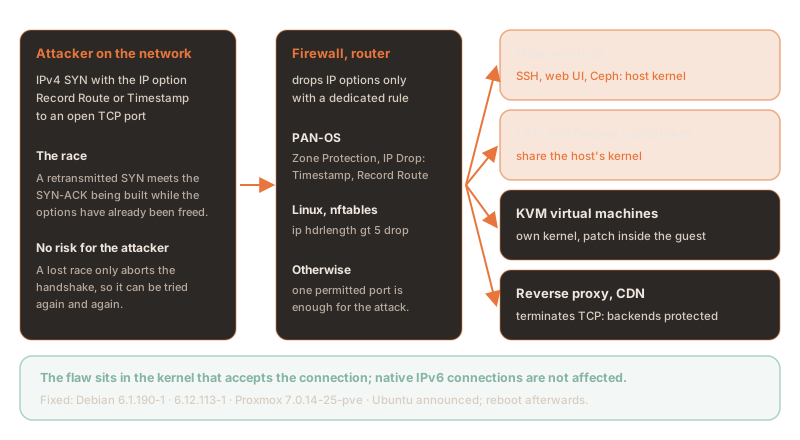
- Prerequisite: a TCP port in the LISTEN state reachable over IPv4 plus packets with IP options that make it all the way to the server. The attacker needs no login.
- Repeatable: according to Anthropic, a lost race only aborts the handshake and the server does not crash. The attacker can therefore try again and again.
- MPTCP: Anthropic's exploit targets servers with a Multipath TCP listener; Anthropic does not say why. The flaw itself sits in plain TCP; the CVE announcement does not mention MPTCP.
- IPv6:
tcp_v6_syn_recv_sock()copies the options, so native IPv6 connections are not affected by the main flaw. A separate patch is to address the IPv6 side of the migration. IPv4 connections to dual-stack sockets ([::]), however, go through the IPv4 path in the kernel.
Who is affected?
Every kernel from Linux 4.4 onwards that accepts connections over IPv4 is affected: SSH, web servers, mail servers, databases, the management interface of a hypervisor. What matters is which kernel accepts the connection:
| System | Affected? | Note |
|---|---|---|
| Linux server from 4.4 with an open IPv4 TCP port | yes | Any listening service will do; a login would only come after the handshake. |
| LXC, Docker and Kubernetes containers | through the host | Containers share the host's kernel. Updating inside the container changes nothing; the host has to reboot. |
| VMs on KVM, VMware, Hyper-V | per guest | Every VM has its own kernel and must be updated inside the guest. |
| Services behind a reverse proxy or CDN | backend no, proxy yes | The proxy terminates TCP and opens a new connection. Plain packet forwarding (NAT, LVS) does not protect. |
| Native IPv6 | no (main flaw) | IPv4 to dual-stack sockets is. |
| RHEL 8, 9, 10 | yes, no fix yet | As of 30 October Red Hat lists neither a fix nor a mitigation; RHEL 6 and 7 are not affected. |
The container trap: on a Proxmox or Docker host, an attack on a container hits the host's kernel directly. Root in the kernel then means root on the whole host, with every VM and container on it. A mail relay or reverse proxy running as an LXC container on the internet is therefore as critical as the host itself.
Safe versions
The fixed versions as of 31 October 2026. What counts is the running kernel, not the installed one.
Upstream, these stable versions are fixed:
5.10.272 · 5.15.223 · 6.1.190 · 6.6.159 ·
6.12.113 · 6.18.56 · 7.2.10 · 7.3.
| System | Package | Fixed in | Note |
|---|---|---|---|
| Debian 13 trixie | linux | 6.12.113-1 | DSA-6568-1, 16 Oct |
| Debian 12 bookworm | linux | 6.1.190-1 | DLA-4841-1, 17 Oct (Debian LTS) |
| Debian 12 bookworm | linux-6.12 | 6.12.113-1~deb12u1 | DLA-4850-1, 22 Oct |
| Debian forky · sid | linux | 7.2.10-1 | already in the archives |
| Proxmox VE 9 | proxmox-kernel-7.0 | 7.0.14-25-pve | built 17 Oct; no-subscription, test and, since 30 Oct, enterprise |
| Proxmox VE 9, kernel 6.17 | proxmox-kernel-6.17 | no fix | last build 6.17.13-21 of 28 Jul; move to 7.0 |
| Proxmox VE 8 | proxmox-kernel-6.8 · 6.14 | no fix | end of life 08/2026, see below |
| Ubuntu 26.10 | linux | 7.3.0-10.10 | announced, not released |
| Ubuntu 26.04 LTS | linux | 7.0.0-43.43 | in -proposed since 28 Oct, not released; the regular 7.0.0-42 (updates) and 7.0.0-38 (security) both lack the fix |
| Ubuntu 24.04 LTS | linux | 6.8.0-149.149 | in -proposed since 26 Oct; the regular 6.8.0-147 lacks the fix; HWE kernels 6.17 and 7.0 without a fix so far |
| Ubuntu 22.04 LTS | linux · linux-hwe-6.8 | 5.15.0-203.213 · 6.8.0-149.149~22.04.1 | linux in -proposed since 26 Oct; the regular 5.15.0-202 lacks the fix |
| Ubuntu 20.04 and older | linux | no fix | not announced yet (ESM) |
Ubuntu's cloud kernels (linux-aws, -azure, -gcp, -oracle,
-ibm) carry their own version numbers; the check script knows the announced versions of every
variant. We have not checked whether Canonical Livepatch covers the flaw; canonical-livepatch status
is authoritative.
An older kernel is no way out: the flaw has been in the code since Linux 4.4, so it is in
every Ubuntu kernel below the fixed version. On 26.04, resolute-security still ships 7.0.0-38
(since 6 October) and resolute-updates ships 7.0.0-42 (since 28 October); both are vulnerable.
Pinning 7.0.0-38 therefore protects nothing; it only forgoes the corrections that came since: the changelog
entries for 7.0.0-39 and -41 list 1,198 CVE IDs that do not appear in the earlier entries.
1.Patch and reboot
On Debian and Proxmox the normal package sources are enough. The second step is the important one: a new kernel only takes effect after a reboot.
sudo apt update
sudo apt full-upgrade            # pulls the fixed linux-image package
sudo reboot

# afterwards: Debian package version of the running kernel
uname -v | grep -oP 'Debian \K\S+'apt update && apt full-upgrade
apt install proxmox-kernel-7.0 # only if the node still runs 6.17
proxmox-boot-tool kernel list # no old kernel pinned?
reboot
uname -r # 7.0.14-25-pve or newerIn a cluster, reboot the nodes one at a time: migrate the VMs first and, with Ceph, set
ceph osd set noout beforehand and unset it after the reboot. These one-liners show whether the
running kernel has the fix and print a ready verdict:
# Proxmox VE
k=$(uname -r); dpkg --compare-versions "${k%-pve}" ge 7.0.14-25 && echo "OK: $k" || echo "VULNERABLE: $k"

# Debian
v=$(uname -v | grep -oP 'Debian \K\S+'); case "$v" in 6.1.*) t=6.1.190-1;; 6.12.*) t=6.12.113-1~deb12u1;; *) t=;; esac; [ -z "$t" ] && echo "CHECK: $v" || { dpkg --compare-versions "$v" ge "$t" && echo "OK: $v" || echo "VULNERABLE: $v"; }
Ubuntu: take the fix early from -proposed
Until the release, the rule for Ubuntu is: put the stopgap in place, then run
apt update && apt full-upgrade and reboot as soon as the update appears. If you do not want to
leave exposed servers open that long, you can take just the kernel from the pre-release pocket
-proposed. 7.0.0-43.43 for 26.04 has been there since 28 October,
6.8.0-149.149 for 24.04 and 5.15.0-203.213 for 22.04 since 26 October; the changelog of
7.0.0-43.43 lists the fix “ipv4: free inet_opt and ireq_opt after an RCU grace period”. We reproduced the steps in
an Ubuntu 26.04 container: without -t apt stays on 7.0.0-42, with -t it installs
7.0.0-43.43.
# make -proposed known; priority 100 means apt takes nothing from it unasked
sudo tee /etc/apt/sources.list.d/proposed.sources >/dev/null <<'EOF'
Types: deb
URIs: http://archive.ubuntu.com/ubuntu
Suites: resolute-proposed
Components: main restricted universe multiverse
Signed-By: /usr/share/keyrings/ubuntu-archive-keyring.gpg
EOF
printf 'Package: *\nPin: release a=resolute-proposed\nPin-Priority: 100\n' | sudo tee /etc/apt/preferences.d/proposed-updates
sudo apt update

# dry run first: which packages would come from -proposed?
sudo apt install -s -t resolute-proposed linux-generic | grep '^Inst'
sudo apt install -t resolute-proposed linux-generic
sudo reboot
uname -r # 7.0.0-43-generic- Only the kernel: priority 100 keeps
apt full-upgradefrom taking anything from-proposed; on 22.04 the file inpreferences.dis mandatory, from 24.04 onwards Ubuntu sets this priority itself. Other kernel variants come through their metapackage, such aslinux-awsorlinux-generic-hwe-22.04, provided Ubuntu has already placed them in-proposed; the dry run with-sshows it. On ARM servers the source ishttp://ports.ubuntu.com/ubuntu-ports. - Pre-release means testing: not every kernel in
-proposedgets released; on 26.04, for example, 7.0.0-17, -26 and -39 never reached the regular pockets. Install on a test system first, then on the exposed servers. - Clean up afterwards: once the kernel is released regularly, delete both files and run
apt update. From then on kernels come only from the normal sources again.
The check script knows the announced fixed versions and therefore already rates a kernel from
-proposed as fixed.
2.The special case of Proxmox VE 8
Proxmox VE 8 has been out of support since August 2026. The last kernel of the 8 branch,
6.8.12-43, dates from 18 August, the optional 6.14.11-9 from 15 May. Both
predate the patch. According to Proxmox, the 7.0 kernel will not be made available for Proxmox VE 8. The
only way out is the upgrade to Proxmox VE 9, with these prerequisites from the upgrade guide:
- every node on 8.4 with
pve-manager8.4.1 or later and at least one clean run ofpve8to9 --full; - hyper-converged Ceph upgraded to Squid 19.2 beforehand;
- tested backups of every VM and container, console access via IPMI or on site, at least 5 GB free on
/; - no containers with systemd 230 or older (cgroup v1), such as CentOS 7 or Ubuntu 16.04.
Until the upgrade is done, the firewall in front of the cluster needs a rule against IPv4 options; the management services must only be reachable from the management network.
3.Stopgap until you can patch
The attack needs IPv4 packets carrying options. Dropping them before they reach the kernel takes away its basis. This works best at the firewall in front of the servers, because it protects every system at once.
At the firewall: Palo Alto Networks
Port and application rules do not help: the first SYN to a permitted port passes before App-ID knows the application. PAN-OS drops IP options through a Zone Protection profile:
- Network › Network Profiles › Zone Protection: create a profile and, on the Packet Based Attack Protection › IP Drop tab, tick Timestamp and Record Route. Palo Alto's best practice adds Strict and Loose Source Routing, Unknown and Malformed.
- Network › Zones: assign the profile to the internet zone and commit.
On the host: nftables
These rules drop TCP packets whose IPv4 header is longer than 20 bytes, in other words carries options. The
inet table sees everything that reaches the host itself or that the host routes, the
bridge table everything that crosses a bridge. Which one you need depends on how the guests are
attached:
| Traffic | Table | Note |
|---|---|---|
| The host's services, such as SSH or the management interface | inet | Also covers traffic from containers and VMs to the host. |
| Guests on a bridge with a physical uplink (layer 2) | bridge | The inet table does not see bridged traffic. In our test the SYNs with options reached the guest without the bridge table. |
| Guests on a bridge that the host only routes to | inet | Enough for traffic from outside. Traffic between guests on the same bridge stays on layer 2 and needs the bridge table. |
| VLAN-aware bridge with a tagged uplink | bridge | The same rule also catches tagged frames. |
| Traffic inside a container, for example over its loopback | none | The host's rules only apply in its own network namespace. Here only the kernel fix helps. |
Together, the two tables cover every one of these setups except the last. The file can be loaded repeatedly and only ever replaces its own tables:
#!/usr/sbin/nft -f
# Stopgap CVE-2026-98432: drop IPv4 TCP packets that carry IP options.
# Re-running replaces only these two tables; other tables stay untouched.
table inet cve98432
delete table inet cve98432
table bridge cve98432
delete table bridge cve98432

table inet cve98432 {
  chain pre {
    type filter hook prerouting priority -310;
    ip protocol tcp ip hdrlength gt 5 counter drop
  }
}
table bridge cve98432 {
  chain pre {
    type filter hook prerouting priority -310;
    ip protocol tcp ip hdrlength gt 5 counter drop
  }
}
Tested: in a VM with Debian kernel 6.12.113, nftables 1.1.3 and iptables 1.8.11. SYNs with
Record Route or Timestamp were dropped for the host as well as for bridged, VLAN-tagged and routed guests;
connections without options went through. nftables 1.0.6 from Debian 12 and Proxmox VE 8 translates
the bridge rule the same way. We have not tested the rules on a Proxmox kernel.
Loading the rules permanently
Loaded with nft -f, the rules only last until the next reboot. For permanent use there are two
ways:
- A dedicated systemd unit: it loads the rules before the network comes up and is modelled on Debian's
nftables.service, just withoutflush ruleset. - An entry in
/etc/rc.local: a good fit if your firewall rules already live there. According to systemd, though, rc.local only runs afternetwork.target, which leaves a short unprotected window at boot.
[Unit]
Description=Stopgap CVE-2026-98432: drop IPv4 TCP packets with IP options
Wants=network-pre.target
Before=network-pre.target shutdown.target
Conflicts=shutdown.target
DefaultDependencies=no

[Service]
Type=oneshot
RemainAfterExit=yes
ExecStart=/usr/sbin/nft -f /etc/nftables.d/cve-2026-98432.nft
ExecReload=/usr/sbin/nft -f /etc/nftables.d/cve-2026-98432.nft
ExecStop=-/usr/sbin/nft delete table inet cve98432
ExecStop=-/usr/sbin/nft delete table bridge cve98432

[Install]
WantedBy=sysinit.targetsystemctl daemon-reload && systemctl enable --now cve-2026-98432-stopgap.serviceFor /etc/rc.local, put this block before exit 0 instead. If it fails, it writes a
message to the journal and rc.local carries on. Even under #!/bin/sh -e your remaining rules are
therefore not skipped:
# CVE-2026-98432 stopgap: drop IPv4 TCP packets with IP options (host, routed and bridged guests)
nft -f - <<'EOF' || logger -t rc.local "CVE-2026-98432 stopgap: nft load failed"
table inet cve98432
delete table inet cve98432
table bridge cve98432
delete table bridge cve98432
table inet cve98432 {
  chain pre {
    type filter hook prerouting priority -310;
    ip protocol tcp ip hdrlength gt 5 counter drop
  }
}
table bridge cve98432 {
  chain pre {
    type filter hook prerouting priority -310;
    ip protocol tcp ip hdrlength gt 5 counter drop
  }
}
EOF
Do not use Debian's nftables.service with the default file: out of the box,
/etc/nftables.conf starts with flush ruleset; the unit runs
nft flush ruleset when it stops. Both delete every nftables table, including those of the
nftables-based Proxmox firewall and every rule created by iptables-nft. Your own tables, on the other hand, get
along with the Proxmox firewall: according to Proxmox, it only touches the tables it generates itself. In our
test, iptables-restore also left both tables in place.
With iptables only
If you manage your rules with iptables, the u32 extension does the same job. It reads the length
field of the IPv4 header; the leading -C prevents duplicate entries:
# CVE-2026-98432 stopgap: drop IPv4 TCP packets with IP options (host and routed guests)
iptables -t raw -C PREROUTING -p tcp -m u32 --u32 "0>>24&0xF=6:15" -j DROP 2>/dev/null || iptables -t raw -I PREROUTING -p tcp -m u32 --u32 "0>>24&0xF=6:15" -j DROP- Enough for: the host's services and guests on a bridge that the host only routes to.
- Not enough for: guests on a bridge with a layer-2 uplink. iptables only sees that traffic with
br_netfilterandnet.bridge.bridge-nf-call-iptables=1. Then, however, every bridged packet also passes through the FORWARD chain; in our test a FORWARD policy of DROP cut the guests off completely. - Check script:
cve-2026-98432-check.shonly recognises the nftables rule as a stopgap.
Practical test: do the rules work?
A test against an open TCP port shows whether your firewall and hosts really drop these packets. It opens three connections: one without options as a control, one with Record Route and one with Timestamp. All it needs is Python 3 on a Linux machine without root rights. It sends just one ordinary connection attempt per variant.
python3 - TARGET-IP 22 <<'EOF'
# Practical test for the CVE-2026-98432 stopgap: does a SYN with IPv4 options reach the service?
import socket, sys
host, port = sys.argv[1], int(sys.argv[2])
OPTIONS = {"none": b"",
           "record-route": bytes([7, 7, 4, 0, 0, 0, 0]),
           "timestamp": bytes([68, 8, 5, 0, 0, 0, 0, 0])}

def probe(opt):
    s = socket.socket(socket.AF_INET, socket.SOCK_STREAM)
    s.settimeout(3)
    if opt:
        s.setsockopt(socket.IPPROTO_IP, socket.IP_OPTIONS, opt)
    try:
        s.connect((host, port))
        return "OPEN"
    except socket.timeout:
        return "DROPPED"
    except ConnectionRefusedError:
        return "REFUSED"
    except OSError as e:
        return "ERROR " + (e.strerror or str(e))
    finally:
        s.close()

res = {name: probe(opt) for name, opt in OPTIONS.items()}
for name, r in res.items():
    print(f"{name:13s} {r}")
with_opts = [r for n, r in res.items() if n != "none"]
if res["none"] != "OPEN":
    print(f"RESULT: INCONCLUSIVE, {host}:{port} accepts no connection even without options")
elif all(r == "DROPPED" for r in with_opts):
    print("RESULT: PROTECTED, SYNs with IP options are dropped on the way")
elif any(r in ("OPEN", "REFUSED") for r in with_opts):
    print("RESULT: NOT PROTECTED, SYNs with IP options reach the target")
else:
    print("RESULT: INCONCLUSIVE, check the lines above")
EOF| Result | Meaning |
|---|---|
PROTECTED | Without options the connection succeeds; with options the SYN disappears on the way. |
NOT PROTECTED | The SYN with options reaches the target: it answers with a connection or a refusal. |
INCONCLUSIVE | Even the control without options fails. Pick a port that is otherwise reachable. |
What the test checks depends on where the probe machine sits. For a complete picture of your own infrastructure, it is worth testing from all three positions:
| Probe machine | Checks | Targets |
|---|---|---|
| On the internet, outside your own networks, for example a cloud VM | the whole chain of firewall and host | every public IP with a permitted port, such as 443 or 25 |
| In the same network segment as the server, so bypassing the firewall | only the rules on the host | SSH and the management interface of the host, services of the guests |
| A guest on the same bridge as other guests | the bridge table | open ports of the other guests |
A PROTECTED only tells you that the packet was dropped somewhere. The counters show where:
on the host the line containing hdrlength, on Palo Alto Networks
show zone-protection zone <zone>. If no counter rises, some other network in between dropped
the packet. The probe machine itself must therefore not sit behind a firewall that drops IP options.
echo "rules: $(nft list ruleset | grep -c 'hdrlength > 5') (expected 2)"
nft list ruleset | grep 'hdrlength > 5'
iptables -t raw -L PREROUTING -v -n | grep '0xf=0x6:0xf'   # iptables variant
Further steps
- Limits: anyone who uses IPv4 options themselves, such as Record Route for troubleshooting, loses those packets. The rule on the host protects VMs from outside but does not replace the kernel update inside the guest.
- Disable MPTCP:
sysctl -w net.mptcp.enabled=0, made permanent under/etc/sysctl.d/. This closes the path of the published exploit, not the flaw; existing MPTCP listeners stay until the service restarts. - Leave migration off:
net.ipv4.tcp_migrate_reqdefaults to 0. - Shrink the attack surface: expose SSH and management interfaces only to the management network or over VPN.
4.The check script cve-2026-98432-check.sh
We have turned the checks from this article into a script. It runs as root, changes nothing on the system and writes only a report. The console shows nothing but fixed texts, kernel versions and counts; ports, addresses and processes go only into the report, which only root can read. That makes the output safe to pass on.
curl -fsSLO https://nokkela.blog/downloads/cve-2026-98432-check.sh
curl -fsSLO https://nokkela.blog/downloads/cve-2026-98432-check.sh.sha256
sha256sum -c cve-2026-98432-check.sh.sha256     # must print: cve-2026-98432-check.sh: OK

sudo bash cve-2026-98432-check.sh
Read the script before the first run: it is just over 500 lines of Bash with no dependencies beyond what Debian, Ubuntu and Proxmox ship. This is the output in our test bed, a Debian 13 container with deliberately planted findings; the kernel there is the WSL2 kernel and therefore of unknown origin:
### cve-2026-98432-check 1.0.1 (Linux TCP use-after-free), fixed versions as of 2026-10-31
[ INFO ] Platform Debian GNU/Linux 13 (trixie)
[ INFO ] Running kernel 6.6.114.1-microsoft-standard-WSL2 (other)
[ INFO ] Inside a container (docker): this kernel belongs to the host, fix it there

### Kernel
[FAILED] 'Kernel of unknown origin 6.6.114.1-microsoft-standard-WSL2: below the fixed version 6.6.159 upstream, ask its vendor'

### Exposure until the fixed kernel runs
[ INFO ] TCP listeners beyond loopback (IPv4 reaches dual-stack sockets too): 1 (report line 9)
[  OK  ] 'MPTCP disabled or not available'
[FAILED] 'Request socket migration on, second path of the race: 1 (report line 12)'
[ INFO ] nftables rules dropping IPv4 packets with options (stopgap): 1 (report line 15)

### Result
[FAILED] 'Yellow: 2, review and assess'
[ INFO ] Report: /opt/cve-2026-98432-check/reports/report-20261031-073818.txt
[ INFO ] View all details: tail -n +8 /opt/cve-2026-98432-check/reports/report-20261031-073818.txt
Red lines mean the running kernel lacks the fix. Yellow lines are settings that widen the attack surface, or a
kernel whose origin the script does not know. The exit code is 2 for red, 1 for yellow
and 0 without findings, so the script also fits into Ansible or a monitoring system.
| Check | What exactly | On a finding |
|---|---|---|
| Running kernel | version against the fixed version of Debian, Ubuntu (every announced kernel variant), Proxmox VE or upstream | red; yellow for unknown origin |
| Installed kernels | Is a kernel package with the fix installed? Then only the reboot is missing. | red if none |
| Pinned kernel | Proxmox: will proxmox-boot-tool boot an old kernel next time? | red |
| TCP listeners | ports beyond loopback, with process (report only) | info |
| MPTCP listeners | the path of the published exploit | yellow |
| Socket migration | net.ipv4.tcp_migrate_req = 1 | yellow |
| Containers | running LXC and Docker containers on this kernel; a run inside a container is detected | info |
| Stopgap | an nftables rule that drops IPv4 packets carrying options | info |
Limits: the script rates versions; it does not test whether the flaw can be exploited. For
Ubuntu it compares with the announced fixed versions; if the update ships under a different number, Ubuntu's
tracker is authoritative. It does not evaluate Livepatch and cannot see a firewall in front of the server. We
could not test the MPTCP check with a real listener because the kernel in our test bed has no MPTCP. It runs on
Debian, Ubuntu and Proxmox VE (dpkg); on the RHEL family the same comparison works with
rpm -q kernel.
No indicators of an attack have been published at the time of writing. In our view, kernel crashes
(Oops, panic) since mid-October on a server with an open port are a reason to take a
closer look.
Frequently asked questions
What is CVE-2026-98432?
CVE-2026-98432 is a use-after-free in the IPv4 TCP handshake of the Linux kernel, present since Linux 4.4 and published on 15 October 2026. A retransmitted SYN carrying IP options can make the kernel read memory that has already been freed while it builds the SYN-ACK. The kernel CVE team scores it CVSS 3.1 9.8, Red Hat 8.1. Anthropic built an exploit in the lab that gains root on a server with an MPTCP listener.
Am I safe if my services run over IPv6?
Native IPv6 connections are not affected by the main flaw because the IPv6 path copies the options. IPv4 connections to dual-stack sockets listening on [::], however, go through the IPv4 path in the kernel and can be attacked. What matters is whether a service can be reached over IPv4.
Are containers and virtual machines affected?
LXC, Docker and Kubernetes containers use the host's kernel; they are only protected once the host boots a fixed kernel. Updating inside the container does not help. Virtual machines on KVM, VMware or Hyper-V have their own kernel and must be updated inside the guest. Services behind a reverse proxy or CDN are protected because the proxy terminates the TCP connection; the proxy itself remains exposed.
Which kernels are safe?
Upstream, 5.10.272, 5.15.223, 6.1.190, 6.6.159, 6.12.113, 6.18.56, 7.2.10 and 7.3 are fixed. Debian 13 is safe from linux 6.12.113-1, Debian 12 from 6.1.190-1 or linux-6.12 6.12.113-1~deb12u1. Proxmox VE 9 is safe from kernel 7.0.14-25-pve. Ubuntu has announced the fixed versions for 22.04 to 26.10 but had not released them by 31 October 2026; the fixed kernels for 22.04, 24.04 and 26.04 sit in -proposed. After updating, the server must reboot into the new kernel.
Does it help to pin an older Ubuntu kernel such as 7.0.0-38?
No. The flaw has been in the code since Linux 4.4, so every Ubuntu kernel below the fixed version is vulnerable; on 26.04 that means 7.0.0-38 just as much as 7.0.0-42. An older kernel also forgoes every correction released since. Only 7.0.0-43.43 contains the fix; as of 31 October 2026 it sits in resolute-proposed; until it is released, the stopgap or a targeted install of the kernel from -proposed helps.
What do I do about Proxmox VE 8?
Proxmox VE 8 gets no fix. Support ended in August 2026; the branch's last kernel dates from 18 August, before the patch existed. The only way out is an upgrade to Proxmox VE 9 with kernel 7.0.14-25-pve or newer; until then a firewall rule against IPv4 options and management access from your own network only reduce the risk.
Does my firewall protect against CVE-2026-98432?
Only if it drops IPv4 packets carrying IP options. Port and application rules let the first SYN to a permitted port through. On Palo Alto Networks firewalls, a Zone Protection profile with IP Drop for Timestamp and Record Route on the internet zone does this; on Linux, an nftables rule with ip hdrlength gt 5 drop in the inet and bridge tables. This lowers the risk until you can patch but does not replace the patch.
Is one rule on the Proxmox host enough for all guests?
For traffic that passes through the host, yes, provided the rule sits in two nftables tables: bridge for guests on a bridge with a physical uplink, inet for the host and for guests the host routes to. In our test it also caught VLAN-tagged frames. The rule does not see traffic inside a container. VMs still need their own kernel update.
How do I test whether the stopgap works?
From a probe machine, connect to an open TCP port once without options and once each with the IPv4 options Record Route and Timestamp. If the connection without options succeeds while the SYNs with options disappear, the rule works. The article includes a ready-made Python test that needs no root rights. The counters on the host or the firewall show where the packet was dropped.
How do I check my servers for CVE-2026-98432?
The Nokkela blog provides the free check script cve-2026-98432-check.sh for this. It runs read-only as root on Debian, Ubuntu and Proxmox VE, compares the running, installed and pinned kernel with the fixed versions and checks for MPTCP listeners, socket migration, containers on the kernel and an nftables stopgap rule. The console shows only versions and counts; ports and processes go into a report that only root can read.
Sources
External sources, as of 31 October 2026 (open in a new tab):
- Linux kernel CVE team, announcement of CVE-2026-98432 with the fixed stable versions
- Linux, commit e3f33b0a1d89 “ipv4: free inet_opt and ireq_opt after an RCU grace period”
- CVE.org, CVE-2026-98432
- Debian Security Tracker, CVE-2026-98432
- Debian, DSA-6568-1 (trixie)
- Debian LTS, DLA-4841-1 (bookworm, linux)
- Debian LTS, DLA-4850-1 (bookworm, linux-6.12)
- Ubuntu, CVE tracker for CVE-2026-98432
- Launchpad, publishing history of the Ubuntu kernel (security, updates and proposed pockets)
- Launchpad, changelog of linux 7.0.0-43.43
- Ubuntu kernel team, How to test kernels in -proposed
- Red Hat, CVE-2026-98432
- Proxmox forum, CVE-2026-98432 in Proxmox VE (statements by the Proxmox team)
- Proxmox, pve-kernel 7.0.14-25
- Proxmox VE, FAQ with support periods
- Proxmox VE, Upgrade from 8 to 9
- Anthropic, Discovering and exploiting vulnerabilities with Claude
- Palo Alto Networks, Packet-Based Attack Protection
- Proxmox VE, Firewall (nftables firewall and custom tables)
- Debian, systemd-rc-local-generator(8): rc.local runs after network.target
- Debian, iptables-extensions(8) including the u32 extension
Patch, protect and reboot your cluster cleanly
You run Proxmox clusters, container hosts or Linux servers on the internet and want to close the flaw without disrupting operations? We check your systems, set up the firewall rules, plan the reboots across the cluster and see you through the upgrade from Proxmox VE 8 to 9, vendor-independent and GDPR-compliant, with data centres in Germany and Finland.
This article is for general information and does not replace a case-by-case assessment. Versions and commands reflect the stated date and must be adapted to your environment. The check script is provided under the BSD-2-Clause licence without warranty. As of October 2026.