
PHP2Shell: close two critical PHP flaws and check for abuse
On 21 October 2026 the PHP project fixed two flaws that let attackers run their own code on web servers without logging in. Both sit in PHP itself, not in the WordPress, Nextcloud or shop on top of it, and attacks are already under way. This article explains who is affected, which package versions are safe, what helps until you can patch and how to look for traces of a break-in with our free check script.
Key takeaways
- What: two flaws in the PHP core,
CVE-2026-109618andCVE-2026-109619, known as "PHP2Shell"; CVSS 4.0 9.2 each. - Impact: unauthenticated code execution as the web server user, with mod_php before your application code even runs.
- Status: mass exploitation attempts since 21 October, a first one as early as 17 October; Germany's BSI warns at level 3 (orange), and security vendors report first successful break-ins.
- Fix: PHP 8.5.12, 8.4.27, 8.3.36, 8.2.35 or your distribution's package, then restart PHP-FPM or Apache.
- Check: our read-only script
php2shell-check.shlooks for traces and shows nothing but counts in the terminal.
Download the check script: php2shell-check.sh, version 1.0.0, Bash,
BSD-2-Clause, changes nothing on the system.
SHA-256: 095b35d4fa5826c0
Download php2shell-check.sh
Checksum (.sha256)
What happened?
The flaw has a long back story and a very short endgame. An audit organised by OSTIF found the first hints of the memory problem back in 2024, but no attack path was visible. In August 2026 the security firm Calif and shortly afterwards Wiz independently reported a way to execute code; in September OpenAI reported further attack paths. The release was planned for 22 October.
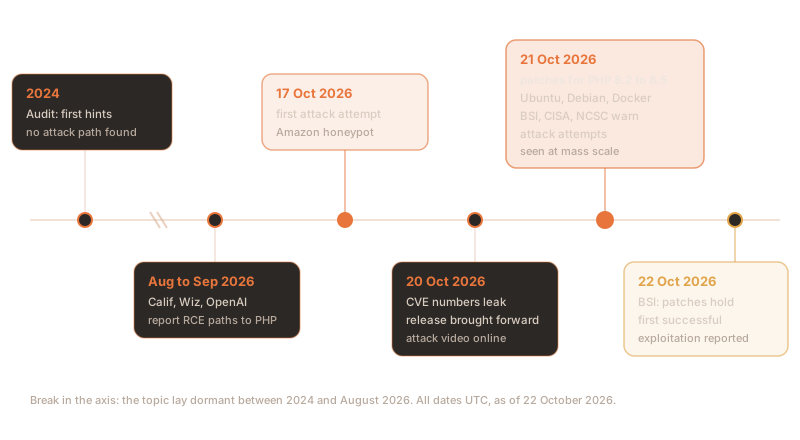
- 17 October: Amazon sees a first attack attempt in its honeypots, four days before disclosure.
- 20 October: the two CVE numbers circulate with a wrong CVSS score of 10.0. The PHP project brings the release forward to 21 October; that evening a video of the attack is published by mistake.
- 21 October: at around 13:30 UTC PHP 8.5.12, 8.4.27, 8.3.36 and 8.2.35 are released with their advisories. Ubuntu, Debian and the official Docker images follow the same day. Germany's BSI issues a level 3 (orange) cyber security warning; CISA, the UK's NCSC and CERT-EU warn as well. Cloudflare, watchTowr and others see attack attempts at mass scale.
- 22 October: in version 1.2 of its warning the BSI states that reports of bypassable patches have been refuted; it knows of no confirmed compromises in the federal administration or regulated sectors yet. Sophos reports a first successful exploitation that probably dropped a Mirai variant.
Putting it in context: mass attack attempts are confirmed, and security vendors report individual successful break-ins. As of this article neither CVE is in CISA's catalogue of known exploited vulnerabilities (KEV). The official score is CVSS 4.0 9.2 for both flaws; the NVD arrives at 9.8 and 8.1 under CVSS 3.1. Anyone running PHP on the internet should not wait for confirmation.
The two flaws in plain words
A PHP worker handles requests in a fixed order: it accepts the request, reads the input (form fields, cookies, the progress of running uploads), runs the script, frees the request's memory and takes the next one. Both flaws live in this framework, not in the application code above it.
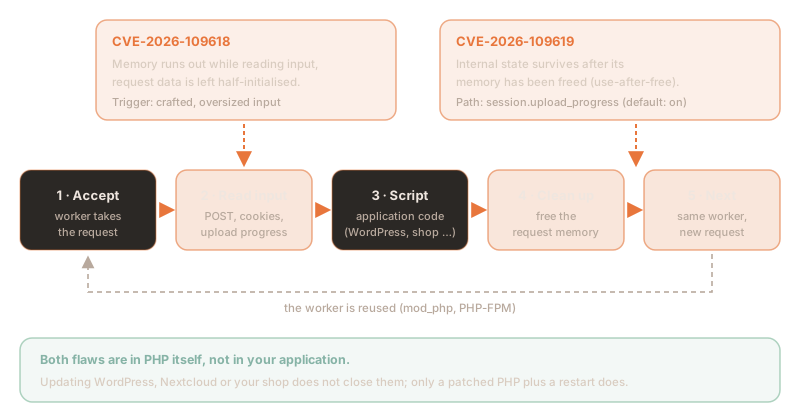
CVE-2026-109618: memory runs out while reading input
PHP caps the memory per request with memory_limit. When the cap is hit, PHP jumps abruptly
out of the running code. If that happens while the request data is only half built, the later clean-up
treats the half-built state as valid, and that can be turned into code execution. An attacker drives memory
up deliberately without breaking the usual limits: multipart requests without a length slip past the
post_max_size check, a multipart part may carry any number of headers, and nested field names
multiply the work.
The PHP project has demonstrated full code execution with mod_php and default limits. In
Datadog's lab a single field name of about 3.5 MB was enough, but with memory_limit
deliberately lowered to 16 MB. The fix replaces the abrupt jump with an orderly abort at a safe point.
CVE-2026-109619: state outlives its memory
A PHP worker serves many requests in turn and keeps global state for that. If a fatal error, a timeout or a memory error interrupts the clean-up, part of that state keeps pointing at the old request's memory even though it has already been freed (use-after-free). The next request on the same worker can then use it. Three paths are confirmed:
- Upload progress:
session.upload_progress.enabledis on by default and reachable even when the application never callssession_start(). - Per-request settings: INI values, for example from
.htaccessorphp_value, that raise warnings early. Hiding errors does not help. - Fatal error backtraces: PHP 8.5 only, with
fatal_error_backtraces.
Why this is so dangerous: with mod_php the attack succeeds before your own code runs at all. Updating WordPress, Nextcloud or Shopware does not close the flaws, and a web application firewall inside the application never sees them. Only a patched PHP helps.
Who is affected?
Every PHP runtime that serves HTTP requests is affected, according to the BSI and CERT-EU across all versions since PHP 5. The risk depends on how PHP runs:
| Server mode | Risk | Note |
|---|---|---|
Apache with mod_php | very high | Full code execution demonstrated for both flaws, before any application code. |
| PHP-FPM (nginx, Apache with proxy_fcgi) | high | CVE-2026-109619 demonstrated via the session path on a normal pool; for CVE-2026-109618 the advisory says no complete exploit has been shown yet. |
php-cgi, FrankenPHP, LiteSpeed | at risk | Rated at risk by the PHP project; exploitability depends on the configuration. |
| PHP on the command line (CLI) | not named | No source names the CLI as affected; the update replaces it all the same. |
| PHP in containers | as above | The image ships its own PHP; apt upgrade on the host does not help. |
The php -v trap: the command only shows the command-line version. Apache or
PHP-FPM may load a different version or build. Check the installed packages and the running processes, not
the CLI. Distributions also backport fixes without changing PHP's version number: the package version is
what counts.
Safe versions
The key fixed versions as of 22 October 2026. Compare them with the package version from your source:
| Source | Package | Fixed in | Note |
|---|---|---|---|
| PHP (upstream) | 8.5 · 8.4 · 8.3 · 8.2 | 8.5.12 · 8.4.27 · 8.3.36 · 8.2.35 | 8.1 and older: no official release, source backports only |
| Ubuntu 26.04 LTS | php8.5 | 8.5.4-0ubuntu1.5 | USN-8948-1 |
| Ubuntu 24.04 LTS | php8.3 | 8.3.6-0ubuntu0.24.04.13 | USN-8948-1 |
| Ubuntu 22.04 LTS | php8.1 | 8.1.2-1ubuntu2.28 | USN-8948-1 |
| Ubuntu 20.04 · 18.04 | php7.4 · php7.2 | 7.4.3-4ubuntu2.29+esm5 · 7.2.24-0ubuntu0.18.04.17+esm14 | USN-8948-2, Ubuntu Pro only |
| Debian 13 trixie | php8.4 | 8.4.27-1~deb13u1 | DSA-6574-1 |
| Debian 12 bookworm | php8.2 | 8.2.35-1~deb12u1 | DLA-4848-1 (Debian LTS) |
| RHEL 10 | php · php8.4 | 8.3.36-1.el10_2 · 8.4.27-1.el10_2 | RHSA-2026:87070 and :87071 |
| RHEL 9 | php 8.0, modules 8.2 and 8.3 | 8.0.30-8.el9_8.1, modules per erratum | RHSA-2026:87151, :87072, :87079; module 8.4 still open |
| RHEL 8 | modules 7.4 and 8.2 | per erratum | RHSA-2026:87080 and :87073 |
| AlmaLinux · Rocky Linux | all streams | own builds | AlmaLinux since the evening of 21 October, Rocky since 22 October |
| PPA ondrej/php · packages.sury.org | php8.1 · php8.0 · php7.4 | 8.1.34-9 · 1:8.0.30-25 · 1:7.4.33-31 | backported from 8.2.35; 8.2 to 8.5 at the upstream versions |
Docker Official Image php | tags 8.5.12, 8.4.27, 8.3.36, 8.2.35 | since 21 October | no 8.1 tags any more; pull the images again, rebuild the containers |
PHP 8.1 and older: upstream support for 8.1 ended in late 2025. You are only safe with a package that has the fix backported (Ubuntu, Ubuntu Pro, Sury, your control panel vendor) or after moving to 8.2 or newer; 8.2 itself reaches end of life on 31 December 2026. Plesk and cPanel say they have shipped fixed builds too, Plesk for 7.4 to 8.1 under unchanged version numbers.
1.Patch and restart
On Ubuntu and Debian the regular package sources are all you need. The second step matters: a running PHP-FPM or Apache process keeps the old code in memory until it restarts.
# install the fixed packages
sudo apt update
sudo apt install --only-upgrade 'php8.1*' libapache2-mod-php8.1

# restart whatever runs PHP for the web (only the services you have)
sudo systemctl restart php8.1-fpm
sudo systemctl restart apache2# Debian 12 (php8.2) or Debian 13 (php8.4)
sudo apt update && sudo apt install --only-upgrade 'php8.2*'
# RHEL, AlmaLinux, Rocky: compare with the erratum, not with php -v
sudo dnf upgrade 'php*'
rpm -q php-common php-fpmOn Ubuntu 22.04 this one-liner shows whether the patch is in; it prints OK or VULNERABLE per
package:
dpkg-query -W -f='${db:Status-Abbrev} ${Package} ${Version}\n' 'php8.1*' libapache2-mod-php8.1 2>/dev/null \
  | awk '$1=="ii"{r=system("dpkg --compare-versions "$3" ge 8.1.2-1ubuntu2.28"); print $2, $3, (r==0?"OK":"VULNERABLE")}'
And this one counts the processes still holding old PHP code in memory. 0 means everything
has been reloaded:
sudo grep -ls 'php.*(deleted)' /proc/[0-9]*/maps 2>/dev/null | wc -l2.Stopgap until you can patch
If you cannot patch right away, take the system off the internet; the BSI, CISA and CERT-EU all recommend this. Where that is impossible, the PHP project's official stopgaps reduce the risk but do not close the flaws. The PHP project is unambiguous: only the update gives complete protection.
; CVE-2026-109618: no memory limit inside PHP, use a cgroup/container limit instead
memory_limit = -1
post_max_size = 8M          ; 32M if uploads are needed
upload_max_filesize = 8M    ; always below post_max_size

; CVE-2026-109619: no upload progress tracking
session.upload_progress.enabled = 0

; PHP 8.5 only
fatal_error_backtraces = 0- Set them so they cannot be overridden: in
php.ini, in the FPM pool asphp_admin_value[…]or in Apache withphp_admin_value, not viaini_set()or.user.ini. Check that no pool, directory or application sets a limit again. - Limit memory another way: without
memory_limitthe server needs a cap through cgroups or the container. Never useRLIMIT_ASorRLIMIT_DATA: they trigger exactly the vulnerable path. - Limit at the web server or proxy: request size, field count, number of multipart parts, headers per part and nesting depth, including requests without a
Content-Length. If you do not need multipart, block it altogether. - Keep workers short-lived:
pm.max_requests = 1in the FPM pool if performance allows. - Clean up: remove invalid or deprecated per-request INI settings that raise early warnings, and fix fatal errors and timeouts that can be reached from outside.
- WAF as an extra layer: Cloudflare has protected sites with managed rules since 21 October, on the free plan too; on paid zones check that they are set to "Block". The AWS rule covers CVE-2026-109619 only. Both vendors explicitly present their rules as a complement to the update.
3.How to spot attacks
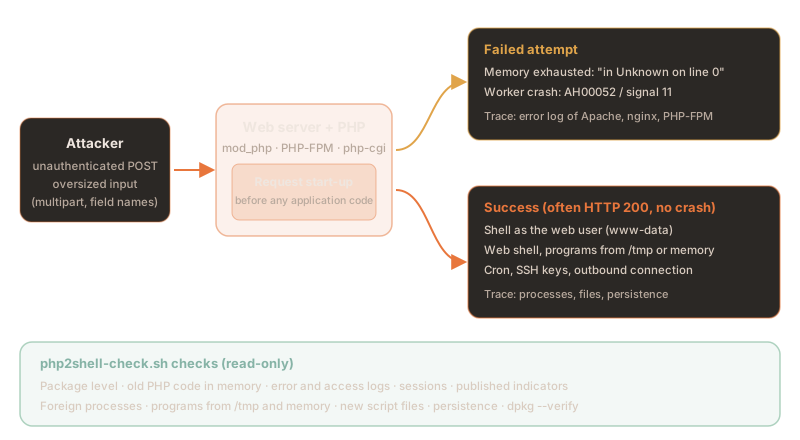
An attack leaves different traces depending on how it ends. Failed attempts often show up in the error
log; a successful attack usually does not. In Datadog's lab the exploit returned a normal
HTTP 200 after 3.1 seconds and the worker kept running. That is why processes and files
matter more than logs.
| Trace | How to recognise it | What it tells you |
|---|---|---|
| Memory error at request start-up | PHP Fatal error: Allowed memory size … exhausted … in Unknown on line 0; "Unknown on line 0" means the error happened before any script ran | attempt; heavy legitimate load can cause it too |
| Crashed workers | Apache AH00052: child pid … exit signal Segmentation fault (11), PHP-FPM child … exited on signal 11 | attempt, often while guessing memory addresses |
| Session errors | Failed to decode session object, Apache exit signal Aborted (6), core dumps under /var/crash or /var/lib/systemd/coredump; session files starting with upload_progress_ | attempt via CVE-2026-109619 |
| Suspicious requests | many large POST or multipart requests from one source, multipart without a Content-Length, unusually long PHPSESSID values | only visible where request sizes are logged (proxy, WAF) |
| Known scanners and sources | user agents php2shell-scan, php2shell-verify, php2shell-test; source addresses from the Amazon, Sophos and ELLIO reports | attempt; investigate the addresses rather than blocking blindly |
| Dropped malware | file /tmp/nfs, started as ./nfs php (a Mirai variant according to Sophos) | strong sign of a break-in |
| Shell as the web user | sh, bash, curl, python3 with parent apache2 or php-fpm | strong sign of a break-in |
| Web shell and downloaders | new .php, .phtml or .php.jpg files owned by the web user, programs running from /tmp or /dev/shm | strong sign |
| Persistence | new cron entries, systemd units, SSH keys, accounts | strong sign |
4.The check script php2shell-check.sh
We have turned the checks in this article into a script that we use on our own and managed servers. It runs as root, changes nothing on the system and writes nothing but a report. The terminal shows only fixed texts, counts and line numbers; paths, addresses and log lines go into the report, which only root can read. That way the output can be shared safely.
curl -fsSLO https://nokkela.blog/downloads/php2shell-check.sh
curl -fsSLO https://nokkela.blog/downloads/php2shell-check.sh.sha256
sha256sum -c php2shell-check.sh.sha256      # must print: php2shell-check.sh: OK

sudo bash php2shell-check.sh                   # lookback from 2026-10-17
sudo SINCE=2026-08-01 bash php2shell-check.sh  # longer lookback
Read the script before its first run: it is just over 500 lines of Bash with no dependencies beyond what Debian and Ubuntu ship. On a test system with deliberately planted traces the output looks like this:
### php2shell-check 1.0.0 (CVE-2026-109618, CVE-2026-109619), since 2026-10-17
[ INFO ] Platform Ubuntu 22.04.5 LTS
[ INFO ] Web users: 1, web roots: 2, error logs: 2, access logs: 1

### PHP packages
[  OK  ] 'All 5 PHP packages at a fixed version'
[  OK  ] 'Running processes use the current PHP code'

### Attack attempts in the logs
[FAILED] 'Errors while setting up requests (Unknown on line 0): 2 (report lines 17-18)'
[FAILED] 'Crashed Apache or PHP workers, core dumps: 3 (report lines 21-23)'
[FAILED] 'Session errors and upload-progress sessions: 2 (report lines 26-27)'
[FAILED] 'Published PHP2Shell indicators (scanners, source IPs, payload): 3 (report lines 30-32)'

### Traces of a compromise
[FAILED] 'Foreign processes under the web user: 2 (report lines 35-36)'
[FAILED] 'Programs running from /tmp, /dev/shm, memory or a web root: 1 (report line 39)'
[FAILED] 'Script files written by the web user: 1 (report line 42)'
[ INFO ] Other changed script files (deployment?): 1 (report line 45)
[FAILED] 'Files of the web user in /tmp, /var/tmp, /dev/shm: 1 (report line 48)'
[FAILED] 'Signs of persistence (cron, SSH, systemd, accounts): 2 (report lines 51-52)'
[FAILED] 'Package files differing from their package: 1 (report line 55)'
[ INFO ] No SSH logins in the journal

### Result
[FAILED] 'Yellow: 10, review and assess'
[ INFO ] Report: /opt/php2shell-check/reports/report-20261022-212135.txt
[ INFO ] View all findings: tail -n +16 /opt/php2shell-check/reports/report-20261022-212135.txt
Red lines mean a patch is missing or old code is still running. Yellow lines are findings to review and
assess. The exit code is 2 for red, 1 for yellow and 0 when nothing
was found, so the script also fits into Ansible or a monitoring system.
| Check | What exactly | On a finding |
|---|---|---|
| Package level | PHP packages against the fixed version for Ubuntu, Debian or the Sury builds; versions without a known fix | red |
| Old code in memory | processes that still map replaced PHP files | red |
| Errors at request start-up | "in Unknown on line 0" in the error logs of Apache, nginx and PHP (rotated and compressed ones included) | yellow |
| Worker crashes | AH00052, PHP-FPM "exited on signal", segfaults in the kernel log, core dumps | yellow |
| Session errors | "Failed to decode session object" and session files that hold nothing but upload progress | yellow |
| Published indicators | scanner user agents and source addresses in the access logs, the known malware file name | yellow |
| Foreign processes | processes of the web user that are no web server, with their socket count | yellow |
| Programs from odd places | from /tmp, /var/tmp, /dev/shm, memory (memfd) or the web root | yellow |
| New script files | written by the web user, including .php.jpg, .htaccess, .user.ini; other changes as info only | yellow |
| Files in temp directories | files of the web user in /tmp, /var/tmp, /dev/shm | yellow |
| Persistence | cron, SSH keys, the web user's login shell, further uid 0 accounts, ld.so.preload, changed files in /etc and the home directories; unchanged package files are filtered out | yellow |
| Package files | dpkg --verify: program files whose checksum differs | yellow |
| SSH logins | successful logins from the journal, to compare with your own | info |
Limits: a green result is no proof. The script looks for the known patterns, and a
skilled attacker with root rights can cover their tracks. Yellow does not mean attack: your own
deployments, a password change or PHP cron jobs trigger it too. The script does not check PHP inside Docker
containers; it says so when Docker is installed. It runs on Debian and Ubuntu (dpkg); for the RHEL family
the same checks apply by analogy with rpm -q and rpm -Va.
5.What to do if you find something
The order matters more than any single step: close first, then check, then clean up.
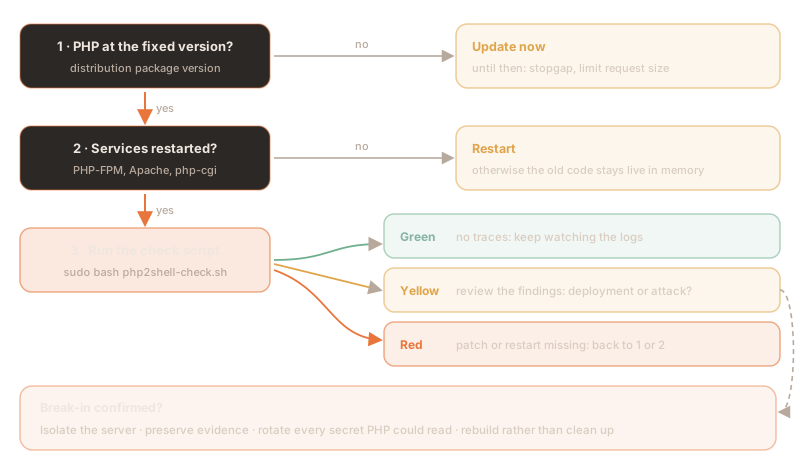
- Isolate: take the server off the network or restrict it to your management access with a firewall. Do not switch it off while you still want evidence: processes and memory would be lost.
- Preserve evidence: the check script's report, the error and access logs from 17 October, the list of running processes and, if possible, a disk image.
- Rotate secrets: treat everything PHP could read as known: database passwords, API keys in
.envor configuration files, cloud credentials, SMTP credentials, the application's session keys. Do this as a precaution even without signs of code execution if the server sat unpatched on the internet: Wiz has shown that the flaw can leak memory contents. - Rebuild rather than clean up: cleaning a compromised server reliably rarely works. Reinstall, deploy patched PHP, check a backup from before 17 October and restore it.
- Report: where personal data is involved, the GDPR's 72-hour deadline applies (Art. 33); organisations under NIS2 have their own reporting duties.
Frequently asked questions
What is PHP2Shell?
PHP2Shell is the name for two critical flaws in the PHP core, CVE-2026-109618 and CVE-2026-109619, which the PHP project fixed on 21 October 2026. They let attackers run code as the web server user without logging in, with Apache mod_php even before the application code runs. Both are rated CVSS 4.0 9.2, and Germany's BSI warns at level 3 (orange).
Am I affected if I keep WordPress or Nextcloud up to date?
Yes, as long as the PHP underneath is unpatched. The flaws are in PHP itself, not in the application, so updating WordPress, Nextcloud or Shopware does not close them. What counts is the PHP package version and a restart of PHP-FPM or Apache after the update.
Which PHP versions are safe?
Upstream, PHP 8.5.12, 8.4.27, 8.3.36 and 8.2.35 are fixed. Older versions get backported packages, for example php8.1 from 8.1.2-1ubuntu2.28 on Ubuntu 22.04, php8.2 from 8.2.35-1~deb12u1 on Debian 12 and php8.4 from 8.4.27-1~deb13u1 on Debian 13. The package version is what counts, not the output of php -v.
Is a stopgap such as memory_limit=-1 enough?
No. The PHP project lists memory_limit=-1, tighter request limits and session.upload_progress.enabled=0 as stopgaps but stresses that they only close individual attack paths. Only the update gives complete protection; until then the BSI, CISA and CERT-EU recommend taking affected systems off the internet.
How do I check whether a server was attacked through PHP2Shell?
The Nokkela blog provides the free check script php2shell-check.sh for this. It runs read-only as root on Debian and Ubuntu servers and checks the package level, old PHP code still in memory, the logs from 17 October 2026 for memory errors at request start-up, worker crashes, session errors and published indicators, as well as foreign processes of the web user, new script files, persistence and modified package files. The terminal shows counts only; the details go into a report that only root can read. A clean result is no proof, because a successful attack can leave no log entry at all.
What should I do if the check script reports findings?
Assess yellow findings first: your own deployments, password changes or PHP cron jobs trigger them too. If a break-in is confirmed, isolate the server, preserve evidence, rotate every secret PHP could read and rebuild the system rather than cleaning it up. Where personal data is involved, the 72-hour reporting deadline of Art. 33 GDPR applies.
Sources
External sources, as of 22 October 2026 (open in a new tab):
- PHP project, security release of 21 October 2026
- PHP project, GHSA-w8hw-w9fx-j79w (CVE-2026-109618)
- PHP project, GHSA-6wmf-4rv5-p3rp (CVE-2026-109619)
- The PHP Foundation, background to the security release
- BSI (Germany), cyber security warning on PHP (level 3)
- CISA, Critical Vulnerabilities in PHP Require Immediate Patching
- NCSC (UK), Critical security issue affecting PHP
- CERT-EU, Security Advisory 2026-018
- NVD, CVE-2026-109618
- Ubuntu, USN-8948-1
- Ubuntu, USN-8948-2 (ESM)
- Debian, DSA-6574-1 (trixie)
- Debian LTS, DLA-4848-1 (bookworm)
- Red Hat, RHSB-2026-013
- AlmaLinux, PHP2Shell updates
- Ondřej Surý, PPA ondrej/php
- Amazon Threat Intelligence, exploitation before disclosure
- Cloudflare, WAF protection against PHP2Shell
- Calif, PHP2Shell
- Wiz, PHP2Shell
- Datadog Security Labs, detection and analysis
- Sophos, proof of concept and first exploitation
- ELLIO, observations from the sensor network
- Eye Security, risk assessment
- Bitdefender, technical advisory
- Elastic Security Labs, detection rules
Patch, check and clean up when it counts
You run PHP applications and want to be sure PHP2Shell has left no traces on your systems? We check your servers, roll out the fixes and guide the clean-up if it comes to that, vendor-independent and GDPR-compliant, with data centres in Germany and Finland.
This article is for general information and does not replace a case-by-case assessment. Versions and commands reflect the stated date and must be adapted to your environment. The check script is provided under the BSD-2-Clause licence without warranty. As of October 2026.