
Self-hosted RAG: GDPR-compliant search
Language models are impressive – but they don't know your internal documents. RAG (Retrieval-Augmented Generation) closes that gap: it searches your knowledge base and hands the model the relevant passages as context. This guide builds a fully self-hosted RAG system – with Qdrant, BGE-M3, reranking and a local LLM. So every document stays in-house.
Key takeaways
- Principle: question → find relevant passages → feed them as context → grounded answer.
- Building blocks: vector database (Qdrant), embedding model (BGE-M3), reranker, local LLM (vLLM).
- Data sovereignty: every step runs locally – neither documents nor questions leave your network.
- Up to date without training: new documents are indexed, not trained in – instantly available, deletable any time.
What is RAG?
A language model answers from its training knowledge – it doesn't know your contracts, manuals and tickets. You could retrain it, but that's expensive, slow and impractical for data that keeps changing. RAG flips the approach: for every question, it first finds the topically relevant passages from your documents and hands them to the model as context. The model then phrases its answer purely from that grounded material.
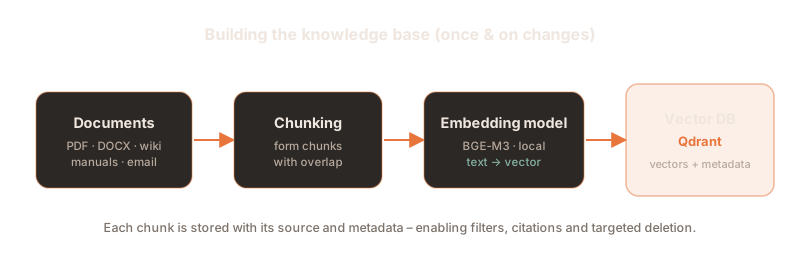
The core is semantic search: texts are translated into vectors (sequences of numbers) that capture their meaning. Similar meaning means a small distance in vector space – so the system finds the right passage even when the question uses different words than the document.
Why self-host & GDPR
A RAG system brings together exactly the most sensitive data: your internal documents and the concrete questions your staff ask. If those go to an external cloud API, you hand over trade secrets and personal data. Self-hosted, everything stays local instead – the simplest, cleanest basis for GDPR compliance, confidentiality and auditability. The language model is a local vLLM server, just like the one we set up in Proxmox 9 with a GPU for a vLLM VM.
The building blocks
A RAG stack consists of a few clearly separated components – all open source and self-hostable:
| Block | Job | Recommendation |
|---|---|---|
| Embedding model | Translate text into meaning vectors | BAAI/bge-m3 (multilingual); alternatives: multilingual-e5-large, jina-embeddings-v3 |
| Vector database | Store vectors & search them instantly | Qdrant; alternatives: pgvector, Weaviate, Milvus |
| Reranker | Re-sort the hit list precisely | BAAI/bge-reranker-v2-m3 |
| LLM | Phrase the answer from the context | vLLM with a local model (e.g. Llama 3.1) |
| Orchestration | Wire the blocks together | plain Python (shown here); alternatives: LlamaIndex, Haystack |
1.Start the vector database
Qdrant runs as a lightweight container. Important: Qdrant ships without authentication by default – be sure to set an API key, otherwise anyone on the network can read and delete your index.
# Secure Qdrant with an API key (port 6333 = REST/dashboard, 6334 = gRPC)
docker run -d --name qdrant \
  -p 6333:6333 -p 6334:6334 \
  -e "QDRANT__SERVICE__API_KEY=your-qdrant-key" \
  -v "$(pwd)/qdrant_storage:/qdrant/storage:z" \
  qdrant/qdrant
Don't expose it to the internet: Qdrant belongs in an internal network segment. The API key guards against unauthorised access, but it's no substitute for network isolation and TLS via a reverse proxy.
2.Set up the environment
A fresh Python environment and the required libraries – again with the fast package manager uv:
uv venv --python 3.12 --seed
source .venv/bin/activate

# Vector-DB client, embedding/reranker models, OpenAI client, PDF parser
uv pip install qdrant-client sentence-transformers openai pypdf3.Collection & model
We connect to Qdrant and create a collection – the container for our vectors. BGE-M3 produces 1024-dimensional vectors; for the distance metric we use cosine similarity.
from qdrant_client import QdrantClient
from qdrant_client.models import Distance, VectorParams
from sentence_transformers import SentenceTransformer

qdrant = QdrantClient(url="http://localhost:6333", api_key="your-qdrant-key")
model = SentenceTransformer("BAAI/bge-m3")   # local, multilingual

# Create the collection: 1024 dimensions, cosine distance
if not qdrant.collection_exists("knowledge_base"):
    qdrant.create_collection(
        collection_name="knowledge_base",
        vectors_config=VectorParams(size=1024, distance=Distance.COSINE),
)4.Prepare documents
Documents are split into overlapping chunks. Chunks that are too large dilute the meaning; too small and they tear apart the context. An overlap keeps sentences at the boundary from getting lost.
from pathlib import Path
from pypdf import PdfReader

def load_text(path: Path) -> str:
    if path.suffix.lower() == ".pdf":
        return "\n".join(p.extract_text() or "" for p in PdfReader(str(path)).pages)
    return path.read_text(encoding="utf-8")

# Split into ~800-word chunks with 120 words of overlap
def chunk(text: str, size: int = 800, overlap: int = 120):
    words = text.split()
    step = size - overlap
    for i in range(0, len(words), step):
yield " ".join(words[i:i + size])5.Index
Now we create a vector for each chunk and store it together with metadata (text and source) in Qdrant. The source is worth its weight in gold later: for citations, for filters and for the right to erasure.
import uuid
from qdrant_client.models import PointStruct

# Load, chunk and index every file in a folder
def index(folder: str = "documents"):
    points = []
    for file in Path(folder).glob("**/*"):
        if file.is_dir():
            continue
        for piece in chunk(load_text(file)):
            vector = model.encode(piece, normalize_embeddings=True)
            points.append(PointStruct(
                id=str(uuid.uuid4()),
                vector=vector.tolist(),
                payload={"text": piece, "source": file.name},
            ))
    qdrant.upsert(collection_name="knowledge_base", points=points)
print(f"{len(points)} chunks indexed.")6.Vector search
The question is embedded with the same model and matched against the index. Qdrant returns the k
most similar passages – deliberately a few more than we ultimately need, because the reranker in the next
step sifts out the truly best ones.
def search(question: str, k: int = 8):
    qv = model.encode(question, normalize_embeddings=True).tolist()
    hits = qdrant.query_points(
        collection_name="knowledge_base", query=qv, limit=k, with_payload=True,
    ).points
    return [(h.payload["text"], h.payload["source"], h.score) for h in hits]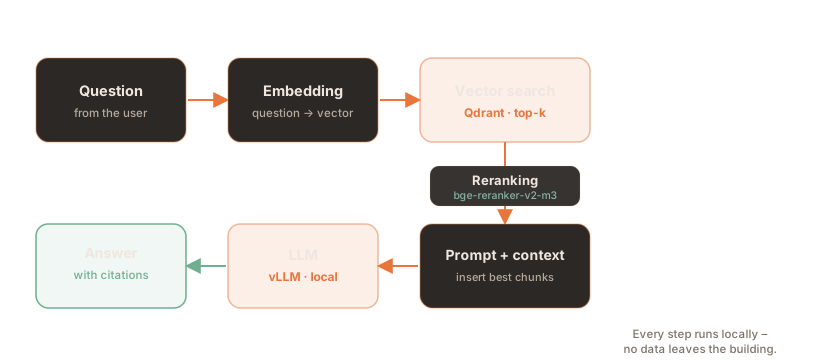
7.Reranking
Vector search is fast but coarse. A cross-encoder reads the question and a passage together and judges the fit far more accurately. That pushes the truly relevant passages to the top – half the battle for good answers.
from sentence_transformers import CrossEncoder

reranker = CrossEncoder("BAAI/bge-reranker-v2-m3")

def rerank(question: str, candidates, top_n: int = 4):
    pairs = [(question, text) for text, _, _ in candidates]
    scores = reranker.predict(pairs)
    ranked = sorted(zip(scores, candidates), key=lambda x: x[0], reverse=True)
return [c for _, c in ranked[:top_n]]8.Generate the answer
The best passages go into the prompt as context. A clear instruction makes the model answer only from the grounded material and cite the source – which guards against hallucinations. The model is the local vLLM server via its OpenAI-compatible API.
from openai import OpenAI

llm = OpenAI(base_url="http://localhost:8000/v1", api_key="your-secret-key")

def answer(question: str) -> str:
    context = rerank(question, search(question))
    sources = "\n\n".join(f"[{s}] {t}" for t, s, _ in context)
    prompt = (
        "Answer the question using only the context below. "
        "Cite the source in square brackets. If the context is insufficient, say so.\n\n"
        f"Context:\n{sources}\n\nQuestion: {question}"
    )
    reply = llm.chat.completions.create(
        model="llama3.1-8b",
        messages=[{"role": "user", "content": prompt}],
        temperature=0.1,
    )
    return reply.choices[0].message.content

print(answer("How long do we retain incoming invoices?"))9.Expose as an API
A thin FastAPI wrapper makes the system usable for applications, chat interfaces or the intranet – and runs best as a container itself:
from fastapi import FastAPI
from pydantic import BaseModel
from rag import answer

app = FastAPI()

class Query(BaseModel):
    question: str

@app.post("/ask")
def ask(q: Query):
    return {"answer": answer(q.question)}
The dependencies go into a requirements.txt, the service into a lean image:
qdrant-client
sentence-transformers
openai
pypdf
fastapi
uvicorn[standard]FROM python:3.12-slim
WORKDIR /app
COPY requirements.txt .
RUN pip install --no-cache-dir -r requirements.txt
COPY rag.py ingest.py app.py .
CMD ["uvicorn", "app:app", "--host", "0.0.0.0", "--port", "8800"]A docker-compose.yml starts Qdrant and the RAG API together as one stack – with automatic
restart and persistent storage:
services:
  qdrant:
    image: qdrant/qdrant:latest
    restart: unless-stopped
    environment:
      - QDRANT__SERVICE__API_KEY=your-qdrant-key
    volumes:
      - ./qdrant_storage:/qdrant/storage
  rag-api:
    build: .
    restart: unless-stopped
    depends_on:
      - qdrant
    ports:
      - "8800:8800"
    volumes:
      - ./documents:/app/documents
- ./models:/modelsdocker compose up -d --buildNetworking in the Compose stack: services reach each other by their service name. So in
rag.py, set the Qdrant URL to http://qdrant:6333 and the vLLM URL to your LLM
server's address – ideally both via environment variables.
You populate the knowledge base once as a one-off container run using the same image – a
tiny ingest.py calls the indexing function from rag.py:
# One-off script: reads the "documents" folder and indexes everything
from rag import index

if __name__ == "__main__":
index("documents")# Drop your files into ./documents, then start a one-off container
docker compose run --rm rag-api python ingest.pyImprove quality
- Tune the chunking: size and overlap are the most powerful levers. Rule of thumb: 500–1000 words, 10–20% overlap – ideally cut at paragraphs rather than mid-sentence.
- Hybrid search: BGE-M3 also produces sparse (keyword-like) vectors. Combining dense and sparse search finds both meaning and exact terms (part numbers, proper names).
- Don't skip reranking: it's the biggest quality gain per line of code.
- Metadata filters: filter by department, tenant or date – this sharpens the hits and enforces access rights.
- Show sources: citations make answers verifiable and build trust.
- Evaluate: a small set of real questions with expected sources quickly shows whether a change is actually better.
GDPR & security
Self-hosting provides the foundation – the implementation makes the difference:
- Data sovereignty: embeddings, vector DB and LLM all run in your own network. No question, no document leaves the building.
- Access control: mirror the permissions from your source systems in the metadata and enforce them as filters at query time – users only see what they're allowed to.
- Right to erasure: because every chunk knows its source, a document can be removed from the index precisely and completely.
from qdrant_client.models import Filter, FieldCondition, MatchValue

# Remove all vectors of a document by its source
qdrant.delete(
    collection_name="knowledge_base",
    points_selector=Filter(must=[
        FieldCondition(key="source", match=MatchValue(value="personnel_file_smith.pdf")),
    ]),
)
Tip: treat the vector database like any other store of personal data – with a record of processing activities, a deletion concept and documented access rights.
Troubleshooting
| Symptom | Cause & fix |
|---|---|
| Answers miss the point | Chunks too large/small, or reranking missing. Tune chunking, add the reranker, increase k. |
| Model invents facts | Prompt not strict enough. Constrain it to "only from the context", lower temperature. |
| Dimension error on upsert | Collection vector size doesn't match the model. Recreate the collection with the correct size. |
401/403 from Qdrant | API key missing or wrong. Align the key in the client and the container. |
| Indexing is slow | Embedding one by one instead of in batches. Pass texts as a list to encode() and use the GPU. |
| Exact terms aren't found | Pure meaning search. Add hybrid search (dense + sparse). |
Frequently asked questions
What exactly is RAG?
RAG stands for Retrieval-Augmented Generation. Instead of relying only on the model's training knowledge, the system searches your own documents for passages relevant to the question and hands them to the model as context. This produces current, verifiable answers – with no retraining at all.
Why self-host RAG instead of using a cloud API?
Because RAG brings together the most sensitive data: internal documents and concrete questions. Self-hosted, they never leave your own network – the simplest basis for GDPR compliance, confidentiality and auditability, without vendor lock-in.
Which embedding model works well for multilingual content?
BAAI/bge-m3 is an excellent multilingual choice: more than 100 languages, up to 8192 tokens of context and both dense and sparse retrieval. Good alternatives are multilingual-e5-large and jina-embeddings-v3.
Do I need a framework like LlamaIndex or Haystack?
No. As shown, a few lines of Python are enough. Frameworks help with more complex pipelines (many file formats, agents, evaluation) but pull in dependencies. To get started, the lean path is often the better one.
How do I implement the right to erasure?
Since every chunk is stored with its source, all vectors of a document can be deleted from Qdrant through a metadata filter (see the code above). After that the content no longer appears in any answer.
Does this work without a GPU?
Embeddings and reranking run on the CPU, just slower. The language model itself, however, benefits greatly from a GPU – see our article on setting up a local vLLM server.
Sources
External sources, as of August 2026 (open in a new tab):
- Qdrant – local quickstart (Docker, collections, API key)
- BAAI – BGE-M3 (multilingual embedding model)
- BAAI – bge-reranker-v2-m3 (cross-encoder)
- vLLM – pooling models (embeddings & reranking)
- Qdrant – official Docker image
Your documents, your knowledge – in your own house
Want to make internal knowledge securely searchable without handing your data over? We plan, build and operate your RAG platform – from the vector database and the models to the integration into your systems. Vendor-independent and GDPR-compliant.
This article is for general information. Code, model and version details are examples and must be adapted to your environment. As of August 2026.