
One instance per customer – scaling .NET, SQL Server and S3 worldwide
One Windows VM running IIS, one MSSQL server and S3 for the documents – once per customer. That model carries you surprisingly far. It also does not break under load: it breaks at three predictable points – licence cost, maintenance windows and distance. This article maps the route in four stages – up to regional cells, meaning complete, mutually independent copies of the whole solution, one per world region. And it says plainly which stage most vendors actually need.
The short version
- Load is rarely the bottleneck. It is licence cost per customer, maintenance windows multiplied by N and travel time across continents.
- The governing rule: a tenant's application, database and documents belong in the same data centre. Everything else follows from that.
- The number that explains it: 100 sequential queries cost roughly 0.1 seconds inside your own data centre – and roughly 26 between Frankfurt and Sydney.
- What a "cell" is: a complete, self-contained copy of the solution – its own web nodes, its own database, its own document storage, its own backups. It carries a hard-capped number of tenants and never calls into another cell. When it is full you build the next one rather than making it bigger. AWS calls this a cell; Microsoft calls the same pattern deployment stamps.
- Four stages – stage 0 is where you are today, then separate and pool, the first complete cell and several regions with a control plane. Most vendors need stage 2, not stage 3.
- Two deadlines are pressing: .NET 8 and .NET 9 both fall out of support on 10 November 2026; the Windows Server 2022 (ltsc2022) container base images leave mainstream support on 13 October 2026.
- The most expensive surprise hides in the SQL Server licence, not in the architecture.
The starting point
The setup is more common than its reputation suggests. A software vendor runs a web-based line-of-business application on .NET. Every customer gets their own instance – a Windows VM with IIS, a Microsoft SQL Server and S3-compatible object storage for the documents. Each customer has their own stack, their own database, their own address.
This is not a backward model; it is a deliberate choice with real advantages. In SaaS vocabulary it is called silo isolation: complete separation per tenant. Data cannot bleed across, one customer cannot starve another, restore and deletion always concern exactly one party and where a customer needs something bespoke, they can have it. That is precisely why siloed installations sell so well into regulated industries.
The price is equally clear – and it only becomes visible when ten customers turn into a hundred and one country turns into a dozen.
Where it breaks first
The order in which this model tears in practice is remarkably stable. It has little to do with compute load:
- The licence bill. Windows Server and SQL Server are payable per instance and the per-instance minimum knows nothing about small customers. A tenant with five users costs the same in licensing as one with five hundred.
- The maintenance window. A security patch is not one operation, it is N operations. With 40 customers across six time zones there is no common window left – and every night belongs to somebody.
- Availability. One VM per customer means a reboot is an outage. There is no second node to take over and none for the database server either.
- Distance. As soon as customers sit on other continents, the application turns sluggish. Not because of bandwidth, but because of travel time – more on that shortly.
- The law. Sooner or later a customer contractually pins down where their data lives. From then on, technology no longer decides where an instance stands.
- Losing the overview. At 20 instances you know each one. At 200 nobody knows which version runs where, or which database is on which schema revision.
More hangs on that ordering than it first appears: the first three items bite before geography matters at all. Many vendors therefore believe their problem is "we need to go global", when what it actually is reads: "we can no longer serve the customers we already have properly." That is good news, because the fix for it is considerably cheaper than a second region.
Worth being clear about: none of these points demands giving up the silo model. They demand industrialising it. The difference between a vendor with 20 instances and one with 2,000 is rarely the architecture of the application – it is whether an instance is a product off a production line or a one-off from the workshop.
The governing rule: things that belong together stay together
Before any question of detail there is a single rule and almost everything else follows from it:
A tenant's application, database and document storage always live in the same data centre.
The reason is arithmetic. Light travels through fibre at roughly 204,000 km/s – a little over 68 per cent of its speed in vacuum. That is just under 9.8 milliseconds of round-trip time per 1,000 kilometres of fibre and fibre does not follow great circles: measured latency typically runs 1.5 to 2 times the geodesic distance. Measured from Frankfurt that is roughly 94 milliseconds to the US east coast, 166 to Singapore, 197 to São Paulo and 266 to Sydney – and that is across a well-built provider backbone, so it is the favourable case. Within Europe the figures sit between 9 and 16 milliseconds. None of this is negotiable – no provider, no protocol and no budget beats physics.
What matters is what an application does with them. Line-of-business applications are rarely frugal with round trips and the slowdown is exactly linear in round-trip time. A hundred sequential queries cost about a tenth of a second inside your own data centre – the same hundred queries between Frankfurt and Sydney cost around 26 seconds. And 100 is not a malicious assumption: 400 queries behind a single list view is a documented real-world figure and on the same route that lands at close to two minutes. The reason this hits so hard: on a developer machine the round-trip time is roughly 0.05 milliseconds, across a continent it is 100 to 266. That is a factor of 2,000 to 5,000 applied to a constant that appears nowhere in the code. It is exactly the point at which customers report "the software is slow" and developers find nothing in the profiler.
On top of that comes everything that happens before the first byte of payload: setting up a connection costs three to five round trips. A cold TLS connection at Sydney distance therefore burns close to a second before any data flows. And even afterwards TCP holds you back: one megabyte takes about seven round trips out of the initial window – nearly two seconds at Sydney distance against 0.7 to the US east coast. Bandwidth does not help with any of this. Only round-trip time counts.
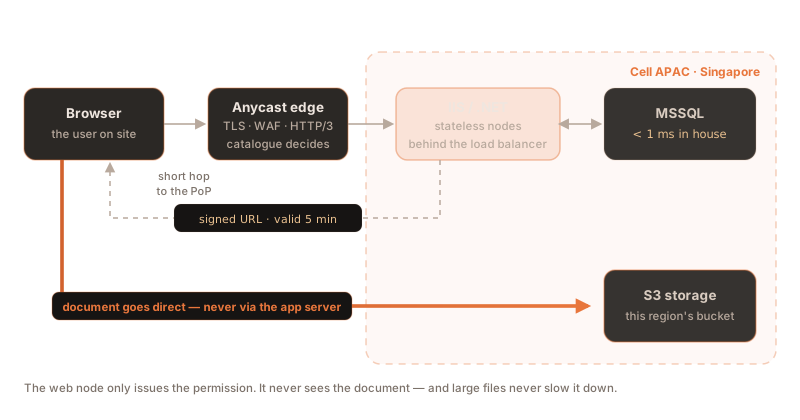
From the governing rule follows a second one: you only speak across the long distance once. The browser talks over the distance to the nearest point of presence; everything after that happens locally. What crosses the ocean is the finished answer – not a hundred individual SQL queries.
What the edge really buys – and what it does not
A point of presence close to the user is the single most effective lever against distance, but not for the reason most people assume. The benefit lies not in caching but in splitting the connection: the edge terminates TLS, absorbs the three to five expensive set-up round trips over the short hop and then forwards the request over a connection to the origin that is already open and warm. Five long round trips become five short ones plus one.
Three common expectations of the edge do not survive contact with practice:
- "The CDN will cache our application." Content delivery networks do not cache HTML and JSON by default and any response carrying
Set-Cookiebypasses the cache anyway. Without deliberate reconfiguration, an authenticated business application sees a hit rate close to zero. What the edge does reliably take off your hands are the static assets – and that alone is worth having. - "
Varywill fix it."Vary: CookieandVary: Authorizationcreate one cache entry per header value. They prevent caching; they do not enable it. - "We will fail over via DNS." At the client the TTL is advisory only: resolvers impose their own floors and caps. Chromium, for instance, assigns a fixed lifetime of about 60 seconds to anything that comes from the operating system's resolver – simply because that resolver supplies no TTL at all. A very low TTL therefore guarantees nothing; a DNS-driven regional switch realistically costs one to two minutes of visible outage. For fast failover, anycast is the better tool.
And one detail that is regularly assumed wrongly during selection: not every service marketed as "global" actually runs on anycast. It is worth checking that for the specific tier you are buying rather than taking the product page at its word.
Four stages
The road from a single VM to a worldwide fleet breaks into four stages. Each one buys off a specific problem and costs specific complexity in return. They build on each other, but you do not have to walk to the end:
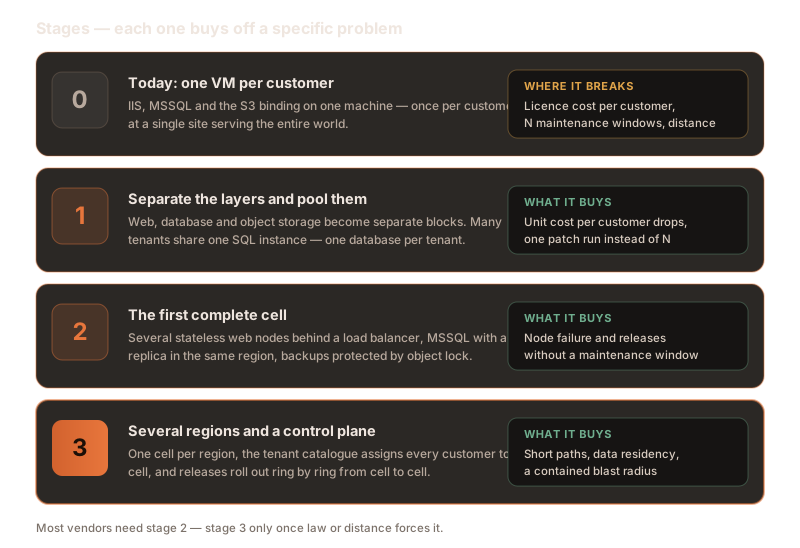
1.Separate and pool
The first step costs the least and returns the most: the three layers stop living together on one machine. "One VM per customer" becomes a web pool, one or a few SQL instances and an object store – with many tenants sharing those building blocks.
Database separation survives the move: one database per tenant, but many databases on one instance. In practice that is the best compromise between isolation and unit cost. A SQL Server instance carries up to 32,767 databases, so the number of tenants is never the limit. The limits are memory, connections and manageability and depending on data volume they sit somewhere between a few dozen and a few hundred tenants per instance.
What this stage buys off:
- Unit cost. Instead of N Windows and N SQL licences you pay for the pool. With small tenants this is the single largest lever in the whole exercise.
- Maintenance windows. A patch run touches one instance, not forty.
- Visibility. There is now one place to look to see how the database layer is doing.
What it costs: from here on there are neighbours. A tenant with a runaway query can noticeably slow down the others. The countermeasures exist – Resource Governor, separate resource pools, hard query timeouts – but they have to be set from day one. From SQL Server 2025 the Resource Governor is available in Standard edition as well; before that it was Enterprise only.
2.The first complete cell
Now the pool becomes a resilient unit – the first complete cell: web nodes, database, object storage, backups and monitoring as one package that runs on its own. Being self-contained is not an end in itself. Because a cell shares neither database nor storage with any other and never calls into one, a fault inside it simply cannot reach the rest – which is what distinguishes it from a merely bigger server. And because every cell is built the same way, the second one is no longer a project but a repetition.
For this particular stack that means:
- Two or more IIS nodes behind a load balancer. In a pure Microsoft environment Application Request Routing (ARR) 3.0 is still the current release and it requires the URL Rewrite module. If you are modernising anyway, use YARP as the front door instead – a tenant router there is a few lines of configuration.
- MSSQL with a replica in the same region, as an Always On availability group with automatic failover.
- Backups protected by object lock in the object store – immutable, so a compromised account cannot take them with it.
- A capacity limit that is measured rather than guessed and then defended. AWS is strict about this: a cell's capacity must exist as an explicit, tested and business-meaningful number – "400 tenants" or "1,200 requests per second" – and be enforced by throttling.
This stage buys off the maintenance window for good: a node is drained, updated and returned to service while the others keep working. It also buys back the nights someone used to spend supervising a reboot.
How big a cell should be is a trade-off with very simple arithmetic: the blast radius of an outage is the reciprocal of the cell count. Ten cells mean a total failure hits ten per cent of customers; a hundred cells, one per cent. Smaller cells contain the damage and raise the management overhead – larger ones the other way round. That number deserves to be chosen deliberately rather than falling out of whatever hardware you happened to buy.
Microsoft's own stipulation: if you build to the cell pattern, you run at least two cells. A single cell is not a cell, it is an ordinary installation with more elaborate management – the entire value of the pattern comes from having a second one to fail over to, migrate to and deploy to first.
3.Several regions and a control plane
Only now is the cell replicated: one in Europe, one in North America, one in Asia-Pacific. Each is an independent copy with its own database and its own object storage. No application data flows between them.
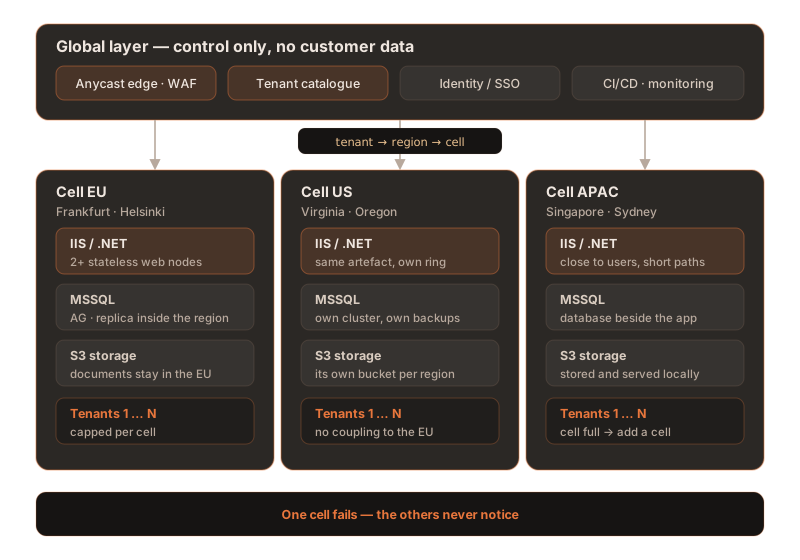
What stays global is only what has to and that is deliberately little:
| Building block | Where it lives | Why |
|---|---|---|
| Tenant catalogue | global, replicated into every region | Answers one question only: which tenant belongs to which cell? Holds no business data. |
| Edge / WAF / TLS | global, anycast | Accepts the request close to the user and forwards it over the backbone. |
| Deployment & monitoring | global | One artefact, many targets; one fleet view plus a view per cell. |
| Application (IIS/.NET) | per cell | Has to stand next to the database. |
| Database (MSSQL) | per cell | Holds the business data and the residency promise. |
| Documents (S3) | per cell | The same residency promise as the database. |
| Backups | per cell, in the same legal area | A backup that leaves the region voids the residency promise. |
That fixes the path of a request: the anycast point of presence accepts it, the catalogue answers "customer → region → cell" and the request lands in the right cell. AWS attaches a hard condition here that is worth taking seriously: the router is the only component with shared state, it must contain no business logic and the data plane must keep running when the control plane fails. If the tenant catalogue is unreachable, existing sessions must not stall – which is why the result of the lookup belongs in a session cookie rather than in every single request.
For the lookup itself there are two common routes. A CNAME per tenant
(customer.app.example.com) allows a move between cells without changing the address, but
creates DNS housekeeping per customer. A wildcard per region
(*.eu.app.example.com) is operationally lean but writes the region into the address – making
exactly the migration you will later need expensive. If you choose the wildcard, plan the migration path
from the outset.
The ceiling almost everyone hits unprepared: Let's Encrypt issues 50 new certificates per registered domain per seven days – globally, across every account. If each tenant gets its own hostname under one domain, you cannot onboard more than roughly 50 new tenants a week. Renewals do not count: an order carrying exactly the same set of names as an existing certificate counts as a renewal and is exempt from the limit, and renewals coordinated through ARI are exempt from every limit. Reissuing the existing estate is therefore fine – what is capped is taking on new tenants. That stopped being a detail once six-day certificates arrived. If you plan to grow fast, spread tenants across several registered domains or use one wildcard certificate per region.
When you do not need this stage: Microsoft puts the practical floor for a real control plane at roughly ten tenants. Below that the tenant list is simply configuration and every piece of automation costs more than it saves. And a second region only pays off once law or distance forces it – it doubles baseline cost, rollout effort and failure modes.
What the application must learn
The painful part is rarely the infrastructure, it is the application. An ASP.NET application that spent years alone on one machine has picked up habits that break the moment a second node appears. The good news: it is a manageable, finite list.
State out of the process
Anything held in one node's memory is wrong from the second node onwards. The list is mercifully finite – and every line has a known remedy:
| What breaks | Why | Remedy |
|---|---|---|
In-process session (InProc) | The default; the session lives in the worker process and is invisible to every other node. | Move it out (SQL Server or Redis) – better still, avoid sessions entirely. |
Static fields, IMemoryCache | Microsoft explicitly scopes IMemoryCache to a single server, or to servers using session affinity. | A distributed cache; with HybridCache, know the limit (see below). |
Uploaded files, generated PDFs, App_Data | They sit on local disk and simply do not exist on the neighbouring node. | Into the object store. |
Scheduled tasks, BackgroundService loops | They run quietly on every node – the nightly job happens N times. | A coordinating job framework or a distributed lock. |
Background jobs deserve a closer look, because the common libraries behave differently. Hangfire is safe across multiple nodes with no extra work – the nodes coordinate through a distributed lock. Quartz.NET, by contrast, only clusters with its database-backed store, needs unique instance IDs and requires node clocks to agree to within one second. And a plain Windows scheduled task on the VM is simply wrong in a farm: it runs every job as many times as there are nodes.
The keys must be identical everywhere
This is the classic that users report as "it keeps logging me out". On .NET Framework the default
AutoGenerate,IsolateApps produces a different key on every server – cookies from node A
are useless on node B. The machineKey therefore has to be set explicitly and identically:
<!-- The same key material must exist on every node of the farm -->
<machineKey validationKey="<64 hex bytes>"
            decryptionKey="<32 hex bytes>"
            validation="HMACSHA256" decryption="AES" />

<!-- Session state out of process; better still: no session state at all -->
<sessionState mode="SQLServer" allowCustomSqlDatabase="true"
              sqlConnectionString="Data Source=sql-eu;Initial Catalog=AspState;…" />
On ASP.NET Core the same topic is called data protection. Two traps wait here and both strike
silently. First, SetApplicationName() must be identical on every node. Second – and this is the
nastier one – naming a key store silently switches off encryption of the keys at rest.
If you move the key ring, you have to turn the protection back on explicitly:
// Naming a key store silently disables encryption at rest — turn it back on.
builder.Services.AddDataProtection()
    .SetApplicationName("acme-suite")          // identical on every node
    .PersistKeysToDbContext<KeyRingContext>()
    .ProtectKeysWithCertificate(keyProtectionCert);
Trap: if you put the key ring in Redis without configuring persistence there, every Redis restart destroys all the keys – and with them every cookie ever issued. All users are logged out at once and nothing in the log looks like an error. Just as important: on ASP.NET Core the session cookie is itself encrypted with the data protection key. A shared session store therefore achieves nothing unless the key ring is shared too – a fault that tends to get misdiagnosed as "Redis is broken". On .NET Framework there is an extra condition: the IIS application paths must be named identically on every node.
Three things you cannot configure away
Not everything can be configured away and it is better to know that in advance:
- SignalR and Blazor Server. A Redis backplane distributes messages, but it does not replace session affinity. If you use these, plan for sticky sessions or rebuild the affected part.
HybridCachefrom .NET 9. The two-tier cache is a genuine win, but its invalidation does not reach the first tier – in-process memory – on the other nodes. For data where a stale value does damage, it is the wrong choice.- Long-lived connections. Anycast is strong at failover but weak on stateful connections: if the route changes, packets arrive at a site that holds no connection state – and the session dies. That applies to TCP and QUIC alike; QUIC merely ends it more cleanly through a stateless reset instead of leaving it hanging. Long-lived connections should therefore be built so that reconnecting costs nothing.
Talk less and retry safely
Over distance every round trip counts. The most effective measures are unglamorous: eliminate
N+1 queries in the ORM, batch queries, project results instead of loading whole entities and
when in doubt use one stored procedure instead of ten separate calls. A retry policy for
transient faults belongs with it – with the important caveat that an automatic retry can execute a
non-idempotent command twice. Write operations therefore need an idempotency key before you switch retries
on.
Time, language and numbers
Once customers sit worldwide, every local timestamp becomes a defect. Timestamps belong in the database in UTC and conversion into the tenant's time zone happens in the presentation layer. The same goes for number and date formats: the server has no culture, the request has one.
The port is not a precondition
A widespread fallacy runs: "modernise first, then scale". The opposite is true. An application on .NET Framework 4.8 can do everything described above – web pool, cell, several regions – as soon as state and keys are in order. .NET Framework 4.8 and 4.8.1 carry no end date at all: they are components of Windows and are maintained for as long as the operating system beneath them.
The port is still worth doing, just for different reasons – Linux containers instead of Windows images, lower running costs, a current runtime. It proceeds incrementally in the strangler-fig pattern: a YARP reverse proxy in front, the System.Web adapters in between and module by module moves to modern .NET while the rest keeps serving. Two points deserve honesty here: ASP.NET Web Forms has no migration path and never will get one; server-side WCF exists in modern .NET only through the successor project CoreWCF. The former .NET Upgrade Assistant has been deprecated; Microsoft now points at the modernisation agent in Visual Studio.
Two deadlines that press right now: .NET 8 and .NET 9 both lose support on 10 November 2026 – .NET 10 is the LTS release, supported to 14 November 2028. And the container base images on Windows Server 2022 (ltsc2022) leave mainstream support on 13 October 2026; anyone running Windows containers should schedule the move to ltsc2025. If you have been rolling out a VM per customer for years, audit the older ones too: Windows Server 2016 ends on 12 January 2027 and extended support for SQL Server 2016 already ran out in July 2026. If you are on .NET Framework 4.8 today the .NET deadlines do not apply to you – one more argument for not making the port a precondition of scaling.
The database layer
This is where the exercise succeeds or fails commercially. The technical options are plentiful, but they hang on the edition – and the edition hangs on the bill.
Inside a region: availability groups
The standard build per cell is an Always On availability group with a synchronous replica in the same region. An availability group holds up to nine replicas, several of which may commit synchronously – exactly how many depends on version and edition – worth checking against the build you actually run. Synchronous means every acknowledgement to the application waits for the replica, which only works over short distances. Microsoft names an upper bound for synchronous replication: a round-trip time below roughly two milliseconds – the order of magnitude between availability zones of one region, typically measured at 0.5 to 1.5 milliseconds. Across continents synchronous replication is out of the question; what remains there is asynchronous and asynchronous means data loss in a failure.
-- Reporting reads go to the secondary, writes stay on the primary.
ALTER AVAILABILITY GROUP [ag-eu-01]
  MODIFY REPLICA ON N'SQL-EU-02' WITH (
    SECONDARY_ROLE (
      ALLOW_CONNECTIONS = READ_ONLY,
      READ_ONLY_ROUTING_URL = N'TCP://sql-eu-02.internal:1433'
    )
  );
Between regions: asynchronous only, manual only
Coupling cells across regions lands you at distributed availability groups. It is worth knowing what that gives you – and what it does not: they support manual failover only, they have no listener of their own and read-only routing works on the primary side only. Microsoft explicitly recommends asynchronous commit for cross-site distributed groups. As a disaster recovery tool this is sound. As a foundation for "the customer works in both regions at once" it is not – and that is precisely why the governing rule says to keep every tenant in exactly one cell.
The edition is the real architectural decision
This is where the most expensive surprises are born. Standard edition offers only basic availability groups and their limits fit one-database-per-tenant about as badly as possible:
| Capability | Standard (basic AG) | Enterprise |
|---|---|---|
| Replicas per group | 2 | up to 9 (several synchronous) |
| Databases per group | exactly 1 | many |
| Readable secondary | no | yes |
| Backup on the secondary | no | yes |
| Online and resumable index operations | no | yes |
"Exactly one database per group" means 300 availability groups for 300 tenants. That is technically possible and operationally an imposition. The last row weighs just as much: online and resumable index operations are exactly the tools you use to roll schema changes across many tenant databases without downtime – and they are Enterprise features. If you need high availability on a pooled instance, budget for Enterprise or move to a managed database service and buy the capability there.
Two further points belong in the same calculation. Passive replicas are free only with Software Assurance – licences without SA carry no high availability or disaster recovery rights at all. And core licensing has a minimum of four core licences per physical processor or per virtual environment, sold in two-core packs. A tiny VM per customer is therefore never tiny in licensing terms.
Useful when pooling: contained availability groups from SQL Server 2022 replicate
logins, users, permissions and Agent jobs at availability group level, through their own contained
master and msdb databases. That removes the tiresome business of re-creating
logins after every failover. SQL Server 2025 adds support for them inside distributed availability
groups.
Schema changes across many databases
With one database per tenant every migration becomes a fleet operation. Two rules have proved themselves. First, versioned migrations rather than reconciliation at runtime – whether with EF Core migrations, DbUp or Flyway matters less than the fact that every database knows its own revision. Second, expand, then contract. A change is split across two releases: first the new shape is added additively so that the old and the new application version both run against it and only in the next release does the old shape disappear. That is the only way to roll a fleet out ring by ring without application and schema drifting apart.
Documents over S3
The object store is the least demanding part of this stack – provided three things are done right.
Documents do not travel through the application server
The most important lever: the web node issues only the permission, not the document. It generates a short-lived signed URL and the browser uploads to or downloads from the object store directly. The application server never sees the file, is never slowed by large attachments and needs no disk space for them.
// The key prefix carries the tenant; it is never taken from user input.
var url = s3.GetPreSignedURL(new GetPreSignedUrlRequest
{
    BucketName = cell.DocumentBucket,
    Key        = $"t/{tenantId}/{documentId}",
    Verb       = HttpVerb.GET,
    Expires    = DateTime.UtcNow.AddMinutes(5)
});
Two details that regularly cost time: signed URLs allow validity of up to seven days, but only with long-lived credentials – a URL signed under an assumed role dies with that role's session, typically after one or twelve hours. And signing does not replace the CORS configuration: the signature governs permission, the browser's same-origin rule is untouched by it.
One bucket per tenant, or a shared one?
Both are defensible and the boundary sits further out than many assume: the AWS default today is 10,000 buckets per account and can be raised to as much as a million – so a bucket per tenant holds up for a long time and it has the unbeatable advantage that access rights, encryption and retention are demonstrably separated per customer. Beyond a genuinely large tenant count, AWS instead recommends access points, or a shared bucket with one prefix per tenant secured by short-lived credentials scoped to exactly that prefix.
The decisive catch with a shared bucket: object lock and lifecycle rules apply at bucket level. Object lock in compliance mode cannot be undone and forces versioning on; lifecycle rules are capped at 1,000 per bucket. If you promise different retention or deletion periods per customer, you need separate buckets – that is not a matter of taste but a product characteristic.
Database and object store drift apart
A point that is almost always underestimated: the object store takes part in no database transaction. A rollback in SQL does not undo an object that has already been uploaded and an aborted upload leaves a row without a file. The way out is a two-phase write – object under a provisional key first, then the transaction, then the confirmation – plus a regular sweeper that finds orphaned objects and orphaned rows. An outbox pattern alone does not solve this.
The same applies one level up to replication between regions. S3 has been immediately consistent within a region since late 2020 – replication into another region is not. Those are two different promises and they get confused readily. If you need a deadline you buy it through replication time control, whose contractual promise is 99.9 per cent of objects within 15 minutes rather than 99.99. More importantly, replication silently skips a whole list of cases – objects that existed before the rule was created among them. That is exactly where the classic "the document is in the database but missing at the failover site" comes from.
European and self-hosted alternatives
If you would rather not hold the object store at a US hyperscaler, there is now a credible field to choose from: Scaleway and OVHcloud from France, IONOS, Hetzner and STACKIT from Germany, Exoscale from Switzerland. If you run it yourself, Ceph with the RADOS Gateway is hard to avoid – its multi-site replication is the strongest self-hosted answer for cross-region mirroring and for several releases it has supported sync policy per bucket. That maps cleanly onto "this customer's documents never leave Frankfurt, while that customer's are additionally mirrored to Paris".
Check this if MinIO is still in your plan: the open-source community edition of MinIO is no longer maintained – the public repository is archived and read-only. Its successor AIStor is a commercial product whose free tier is limited to a single node, which rules it out for distributed, multi-tenant operation. If MinIO sits in your design, verify that assumption now rather than at the next security advisory.
Data residency: where the law forces a region
Here architecture leaves technology behind. Three terms get mixed up routinely and mean different things:
- Data residency – where data is physically stored. A promise about locations.
- Data localisation – a legal obligation that data must not leave the country. A promise is not enough here; you need the region.
- Data sovereignty – whose law can reach the data. That follows the operator, not the location: a US provider remains subject to US law even when the server stands in Frankfurt.
The distinction is practical, because only the middle case compels a region of its own. The GDPR itself contains no localisation requirement – it restricts transfers to third countries (Chapter V). "We store exclusively in the EU" is therefore usually a commercial promise rather than a statutory demand. What genuinely forces a region falls into four categories:
- Contractual promises – by far the most common reason. Supervisory law sharpens it: DORA has applied since 17 January 2025 and requires every ICT contract with a European financial entity to name the data locations and include an exit plan. That is effectively a residency mandate by contract.
- Sector rules. In the US the trigger is not HIPAA – HIPAA imposes no residency requirement – but FedRAMP: its High baseline requires, through control SA-9(5), that processing and storage stay in the US, in US territories or under US jurisdiction; the Low and Moderate baselines carry no such location rule. FedRAMP itself imposes no citizenship requirement – that comes from the individual agency, if at all.
- Genuine localisation duties. Russia (152-FZ) requires the primary database holding Russian citizens' personal data to sit physically in Russia. China mandates in-country storage for critical information infrastructure operators and for handlers above defined volume thresholds. India has had the central bank's payment-data rule enforced for years, while the general DPDP regime only bites fully in 2027.
- Market access. For mainland China the decisive hurdle is not privacy law but ICP filing: serving from servers inside China requires a Chinese legal entity and a registration – without it the host blocks the site. Add the MLPS grading on top. China is therefore not another cell but a market-entry project in its own right.
Two widespread assumptions are out of date – carrying them into a design means planning one region too many: Saudi Arabia replaced the strict localisation default in its data protection law with a risk-assessment regime. And the Canadian province of British Columbia repealed its in-country storage requirement back in 2021; in Canada only the Nova Scotia rule still stands and that one is expiring too.
For the European part the picture has eased lately. Microsoft's EU Data Boundary has been complete since early 2025 and in January 2026 AWS brought its European Sovereign Cloud into service – a legally and operationally separate partition whose first region sits in Brandenburg. The United Kingdom received a renewed adequacy decision at the end of 2025 running to the end of 2031; for Norway and the other EEA states the GDPR applies anyway, so an EU cell is sufficient there. And mutual adequacy with Brazil has been in place since early 2026. Conversely, the European cloud certification scheme EUCS is still not adopted – anyone tendering for "sovereign" today works with contracts and evidence rather than a finished seal.
One point concerns the budget rather than the architecture: the EU Data Act has applied since 12 September 2025 and bars cloud providers from charging any switching fee from 12 January 2027 – including the egress charges for taking your data with you when you switch. Ordinary usage charges, the normal traffic price in day-to-day operation among them, are untouched. If you are planning a provider change or the relocation of a cell, that date is worth knowing.
The most frequently overlooked point: the residency promise covers every copy. A backup in another region, a centrally aggregated log carrying personal fields, an error report with payload data in a service outside the legal area – each of those voids the promise. That is exactly why the global layer holds control and never customer data.
Running the fleet
The difference between 20 and 200 instances is operations, not architecture. Four areas decide it.
Onboarding new tenants
A new customer must not be a project. Onboarding is a workflow that creates the database, the storage area, the DNS record, the certificate, the configuration and the catalogue entry in one pass – repeatable, abortable and with an explicit failure policy per step. Microsoft describes the decisive fork neatly as a choice between "tenant list as configuration" and "tenant list as data". Only the second yields a control plane; the first is a text file that will eventually be wrong.
The reverse direction is mandatory: a customer who leaves must demonstrably disappear – database, objects, backups, logs, catalogue entry. Without automated deletion you cannot credibly promise Article 17 of the GDPR.
-- No business data lives here. Only: which tenant belongs to which cell.
CREATE TABLE dbo.TenantCatalog (
    TenantId    uniqueidentifier NOT NULL PRIMARY KEY,
    HostName    nvarchar(253)    NOT NULL UNIQUE,   -- customer.app.example.com
    CellId      varchar(32)      NOT NULL,          -- eu-central-01
    Residency   varchar(8)       NOT NULL,          -- EU | US | APAC
    Ring        tinyint          NOT NULL,          -- 0 canary … 2 broad
    Status      varchar(16)      NOT NULL           -- active | migrating | suspended
);
Deploying in rings
A fleet never receives the same release at the same time. Rollout runs ring by ring: a canary cell with internal or particularly cooperative tenants first, then a narrow wave, then the breadth. Between rings sits a wait long enough for faults to surface – usually at least one full working day in the relevant time zone. That presupposes that several application versions can work against the same schema, which is what "expand, then contract" above is for.
Probably the single biggest operational win of the year for Windows fleets: hotpatching through Azure Arc has been free since May 2026 and works on any substrate – including your own hardware and third-party hosters. On Windows Server 2025 it makes eight of the twelve months reboot-free. If you patch one VM per customer today, that halves the number of maintenance windows without changing a line of architecture.
Seeing what is going on
Monitoring has to know about cells. Every metric, log line and trace carries the cell and the tenant as an attribute, there is a dashboard per cell and an aggregated fleet view above it. The reason is uncomfortably simple: a single bad cell disappears into the fleet average. If you only watch the mean, you learn about the outage from the customer.
Backup and restore per tenant
The decisive capability is not the backup but the restore of a single tenant without touching the others. With one database per tenant that is elegant – a point-in-time restore concerns exactly one database. For the object store it takes versioning and object lock so that a compromised account cannot take the backups with it. And it takes practice: a restore procedure that has never been rehearsed is an assumption, not a procedure.
The licence arithmetic
In the end the unit-cost calculation decides which stage is economic. For this stack the structure is always the same:
| Cost block | Silo (VM per customer) | Pooled cell |
|---|---|---|
| Windows Server licence | per customer | per node, shared |
| SQL Server licence | per customer, with a minimum per environment | per instance, shared |
| Compute | paid for while idle too | sized to the peak of the sum, not the sum of the peaks |
| Operational effort | linear in customer count | largely constant per cell |
| High availability | payable per customer | paid once per cell |
The two middle rows are the actual lever. Idle time is the largest silent expense in the silo model: an instance for a customer with eight users is entirely unoccupied at night, at weekends and over lunch – and costs money regardless. And "peak of the sum" beats "sum of the peaks" convincingly from a handful of tenants onwards, because load peaks even out across customers and time zones.
For orders of magnitude on the licence side, using the open list prices for SQL Server 2025: a two-core pack costs roughly US$3,900 on Standard and about US$15,100 on Enterprise. Because of the four-core minimum per virtual environment, even a two-core VM per customer consumes two packs – so roughly US$7,900 per customer on Standard and US$30,000 on Enterprise, before Windows Server, compute, storage, backup and labour. Multiplied by the customer count, this is almost always the single largest line item of the whole exercise and the strongest reason to tackle stage 1 at all.
These are list prices, useful for comparing orders of magnitude rather than as a quote. A vendor running software as a service for third parties usually does not buy from the price list but through a service-provider rental programme or by the hour in the cloud, where the arithmetic looks different. The decisive point survives every model, though: the minimum purchase per environment makes small customers disproportionately expensive.
Calculate in unit cost per tenant per month, not in total cost. Only that figure reveals which customer size the silo can carry at all – and above which size a dedicated cell for one large customer becomes the right answer again. Offering both at once is not a contradiction: AWS calls this mixture of silo and pool the bridge model and treats it as the normal case rather than a compromise.
A decision framework
Seven questions that usually settle the direction quickly:
- What is our unit cost per tenant per month – and how much of it is licensing rather than compute?
- How many maintenance windows did we coordinate last quarter and how many person-hours did that cost?
- How many round trips does our most-used screen make – and what is that number multiplied by 266 milliseconds, the Frankfurt–Sydney figure?
- Is there a customer to whom we have contractually promised a residency we cannot technically enforce?
- Can we onboard and fully delete a tenant automatically today?
- Do we know at any moment which application and schema version is running at which customer?
- Have we ever rehearsed the restore of a single tenant – or only checked the backup?
If the first two questions make you wince, you belong on stage 1. If question three does, you need shorter paths rather than necessarily a second region. Only when question four is answered with yes is stage 3 genuinely due.
Frequent questions
Does the application have to be ported to modern .NET before it can scale?
No. The most expensive mistake is treating the port as a precondition. An ASP.NET application on .NET Framework 4.8 runs across a multi-node web pool as soon as three things are true: identical machineKey values on every node, session state held out of process and no files written to local disk. That is days of configuration work, not months of porting. The port is worth doing on its own merits – Linux containers, running costs, security updates – and it can proceed incrementally through the System.Web adapters and a YARP reverse proxy while the existing application keeps serving traffic.
Is SQL Server Standard enough when every tenant has its own database?
For plain operation yes, for high availability usually not. One instance carries up to 32,767 databases, so the number of tenants is never the constraint. Standard edition, however, only offers basic availability groups: two replicas, exactly one database per availability group and no readable secondary. With one database per tenant that means one availability group per tenant, which becomes operationally untenable quickly. The tools for migrating schema across many databases without downtime – online and resumable index operations – are Enterprise features as well. If you need high availability on a pooled instance, budget for Enterprise or move to a managed database service.
When is a second region genuinely worth it?
When law or distance forces it, not when it looks like good architecture. Law forces it as soon as a customer requires contractually or statutorily that their data does not leave the country or economic area. Distance forces it once the application becomes noticeably sluggish across a continent – which is almost always down to the number of round trips per page rather than bandwidth. A second region doubles baseline cost, rollout effort and failure modes; anything short of that is solved more cheaply by terminating closer to the user and making fewer round trips.
One bucket per tenant or a shared bucket with prefixes?
A bucket per tenant holds up for a long time and is easy to audit: the AWS default today is 10,000 buckets per account and can be raised to as much as a million. Only beyond a genuinely large tenant count does a shared bucket with one prefix per tenant and short-lived credentials scoped to that prefix become more practical. The catch matters: object lock and lifecycle rules apply at bucket level; lifecycle rules are capped at 1,000 per bucket. If you promise different retention periods to different customers, you need separate buckets.
How does a tenant move from one region to another?
In the four steps AWS calls clone, flip, redirect and forget. First the state is copied into the target region and kept up to date, then the tenant goes read-only for a moment while the catalogue entry is switched to the new cell, then requests to the old address are redirected to the new one and only at the end is the data in the source region demonstrably deleted. That is why the move has to be designed for from the start: if the region is baked into customer URLs or into foreign keys, the tenant can never move again.
Sources
External sources, as of August 2026 (open in a new tab):
- Microsoft Azure Architecture Center – Deployment Stamps pattern (the canonical pattern for cells)
- AWS Well-Architected – Reducing the Scope of Impact with Cell-Based Architecture
- Microsoft – Tenancy models for a multitenant solution (silo, pool and the shapes in between)
- Microsoft – .NET Support Policy (end-of-support dates for .NET 8, 9 and 10)
- Microsoft – Basic availability groups (the limits of Standard edition)
- Microsoft – Distributed availability groups (manual failover only, no listener of their own)
- Microsoft – SQL Server Licensing Guide (core minimums, rights for passive replicas)
- AWS – Bucket restrictions and limitations (bucket quotas per account)
- AWS – Sharing objects with presigned URLs (validity and credentials)
- Ceph – RADOS Gateway multi-site (cross-region replication when self-hosting)
- Microsoft – Configure ASP.NET Core Data Protection (a shared key ring across nodes)
- Microsoft – Incremental ASP.NET to ASP.NET Core migration (System.Web adapters and YARP)
From one-off to production line – without breaking operations
We accompany software vendors along exactly this route: analyse the existing solution, determine the stage that actually pays off and cut the rebuild so that live operations can absorb it. Vendor-independent, with data centres in Germany and Finland – and with European data sovereignty as the default rather than a surcharge.
This article describes the situation as of August 2026 and is intended as general information. Product versions, licence terms and the legal position continue to develop – please check the points named here against current vendor information before deciding.