
Distribute a /56 IPv6 to every edge over IPsec
A provider-delegated /56 needs to be carved up across several remote sites – each edge gets its own /64, reachable over encrypted IPsec tunnels. The trick: between the tunnel endpoints we route with ULA addresses. That keeps the public prefix clean and the underlay stable. This guide builds it step by step on Palo Alto PAN-OS.
Key takeaways
- Topology: hub-and-spoke – one HQ firewall, several edges, one IPsec tunnel each.
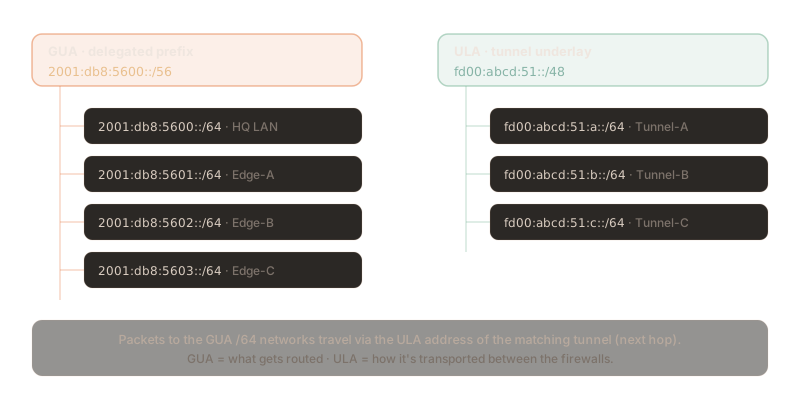
- GUA /56: split into a /64 per site (this is what gets routed).
- ULA underlay: every tunnel interface carries a ULA address – it's the next hop (this is how it's routed).
- Routing: static for a few sites, BGP over the ULA addresses for many.
The scenario
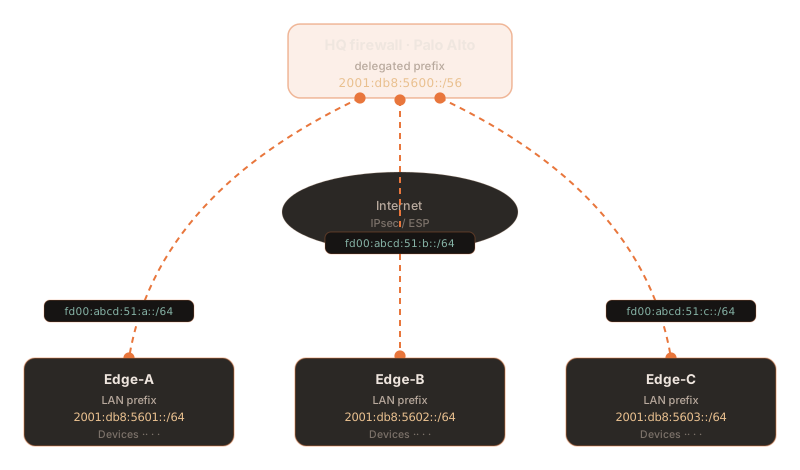
At headquarters (HQ), the provider-delegated prefix 2001:db8:5600::/56 terminates. Three remote
sites (Edge-A, Edge-B, Edge-C) attach to the hub over one IPsec tunnel each. Every edge should run its own
/64 from the /56 – and all devices behind them should be able to talk to each other and to HQ.
Why ULA as the underlay?
You could number the tunnel interfaces with GUA addresses from the /56 too. But that mixes two things best
kept apart: the transport routing between firewalls and the production networks. ULA
addresses (fd00::/8) solve this elegantly:
- Stability: if the provider changes the delegated /56, the tunnel next hops stay the same – the routing logic is untouched.
- Cleanliness: the scarce public /56 is used only for production devices, not for point-to-point links.
- Uniqueness: a randomly chosen ULA prefix (RFC 4193) practically never collides with other networks – ideal for a private underlay.
- Separation: underlay (ULA) and overlay (GUA) can be filtered, monitored and documented independently.
Addressing plan
Two address spaces, cleanly separated: the GUA /56 for the site networks and a ULA /48 for the tunnels.
| Site | GUA network (LAN) | Tunnel ULA (hub ↔ edge) |
|---|---|---|
| HQ | 2001:db8:5600::/64 | — |
| Edge-A | 2001:db8:5601::/64 | fd00:abcd:51:a::1 ↔ ::2 |
| Edge-B | 2001:db8:5602::/64 | fd00:abcd:51:b::1 ↔ ::2 |
| Edge-C | 2001:db8:5603::/64 | fd00:abcd:51:c::1 ↔ ::2 |
Tip: we use a readable /64 per tunnel here. If you'd rather address more sparingly, use a
/127 per point-to-point link (RFC 6164) – the logic is identical.
1.Crypto profiles
First, modern Phase 1 and Phase 2 profiles. We use IKEv2, a strong DH group and AES-GCM:
# Phase 1 (IKE) and Phase 2 (IPsec)
set network ike crypto-profiles ike-crypto-profiles IKE-AES256 dh-group group20 hash sha384 encryption aes-256-cbc lifetime hours 8
set network ike crypto-profiles ipsec-crypto-profiles IPSEC-GCM esp encryption aes-256-gcm lifetime hours 12.IKE gateways
One IKE gateway per edge. The transport (the tunnel's underlay) runs over the IPv4 internet here – the encrypted IPv6 travels inside it later. The addresses are documentation-range examples:
set network ike gateway GW-Edge-A protocol version ikev2
set network ike gateway GW-Edge-A local-address interface ethernet1/1
set network ike gateway GW-Edge-A peer-address ip 203.0.113.10
set network ike gateway GW-Edge-A authentication pre-shared-key key "super-secret-psk"
set network ike gateway GW-Edge-A protocol ikev2 ike-crypto-profile IKE-AES256
# Edge-B and Edge-C analogously (peer-address 203.0.113.11 / .12)3.Tunnel interfaces with ULA
Now the heart of it: the tunnel interfaces get their ULA address. It becomes the next hop through which the GUA networks are reached. We lower the MTU right away for the IPsec overhead:
set network interface tunnel units tunnel.1 ipv6 enabled yes
set network interface tunnel units tunnel.1 ipv6 address fd00:abcd:51:a::1/64
set network interface tunnel units tunnel.1 mtu 1400
# Hub side ::1, Edge-A side ::2 — one ULA /64 per tunnel4.IPsec tunnels & proxy IDs
The IPsec tunnel ties together the gateway, the crypto profile and the tunnel interface. Since we work route-based, we leave the IPv6 proxy ID (the traffic selector) open – routing is done by the routing table:
set network tunnel ipsec TUN-Edge-A auto-key ike-gateway GW-Edge-A
set network tunnel ipsec TUN-Edge-A auto-key ipsec-crypto-profile IPSEC-GCM
set network tunnel ipsec TUN-Edge-A tunnel-interface tunnel.1
# Route-based: leave the traffic selector open (all IPv6)
set network tunnel ipsec TUN-Edge-A auto-key proxy-id-v6 ANY local ::/0 remote ::/0
Proxy ID vs. traffic selector: between two PAN-OS firewalls the open selector
::/0 is enough. If the peer is a third-party device, the local and remote proxy IDs must match
exactly – there you enter the concrete /64 or /56 prefixes.
5.Static routing
Now we connect GUA and ULA: on the hub, each edge /64 points at the ULA address of the matching tunnel as its next hop:
set network virtual-router VR-Default routing-table ipv6 static-route Edge-A-LAN destination 2001:db8:5601::/64 nexthop ipv6-address fd00:abcd:51:a::2
set network virtual-router VR-Default routing-table ipv6 static-route Edge-B-LAN destination 2001:db8:5602::/64 nexthop ipv6-address fd00:abcd:51:b::2
set network virtual-router VR-Default routing-table ipv6 static-route Edge-C-LAN destination 2001:db8:5603::/64 nexthop ipv6-address fd00:abcd:51:c::2
On each edge the counterpart: the whole /56 (the hub and, via the hub, the other sites) back through the hub ULA. The local /64 stays "connected" and wins automatically thanks to longest-prefix match:
set network virtual-router VR-Default routing-table ipv6 static-route To-HQ destination 2001:db8:5600::/56 nexthop ipv6-address fd00:abcd:51:a::1
# Edge-A reaches Edge-B/-C via the hub (hub-and-spoke).6.Scaling with BGP
With many sites, static routes become tedious. Then MP-BGP over the ULA tunnel addresses takes over: each edge advertises its /64, the hub summarises to the /56. New sites bring themselves in – with no hand on the routing table:
set network virtual-router VR-Default protocol bgp enable yes
set network virtual-router VR-Default protocol bgp local-as 65000
set network virtual-router VR-Default protocol bgp peer-group SPOKES peer Edge-A peer-as 65000
set network virtual-router VR-Default protocol bgp peer-group SPOKES peer Edge-A local-address interface tunnel.1 ip fd00:abcd:51:a::1/64
set network virtual-router VR-Default protocol bgp peer-group SPOKES peer Edge-A peer-address ip fd00:abcd:51:a::2
set network virtual-router VR-Default protocol bgp peer-group SPOKES peer Edge-A address-family-profile ipv6-unicast
Advanced Routing: from PAN-OS 10.2 there's the Advanced Routing Engine with
logical routers instead of virtual routers. The logic (BGP peering over the ULA addresses) stays
the same; only the command paths become set network logical-router ….
7.Zones & security policy
Routing alone isn't enough – the firewall also has to permit the traffic. The tunnel interfaces go into a VPN zone, then we allow the site-to-site traffic for the /56:
set zone Z-VPN network layer3 [ tunnel.1 tunnel.2 tunnel.3 ]
set rulebase security rules Allow-Sites-v6 from Z-VPN to Z-VPN source 2001:db8:5600::/56 destination 2001:db8:5600::/56 application any service application-default action allow
commit8.Verify
After the commit, check the tunnels, routes and reachability in operational mode:
# Phase 1 / Phase 2 state
show vpn ike-sa
show vpn ipsec-sa

# Show only the static IPv6 routes
show routing route type static afi ipv6

# Test the forwarding decision and check reachability
test routing fib-lookup virtual-router VR-Default ip 2001:db8:5602::1
ping source 2001:db8:5600::1 host 2001:db8:5601::1
The routing table should show, for each edge /64, the ULA address as the next hop over the correct tunnel interface:
2001:db8:5601::/64   fd00:abcd:51:a::2   tunnel.1   static
2001:db8:5602::/64   fd00:abcd:51:b::2   tunnel.2   static
2001:db8:5603::/64   fd00:abcd:51:c::2   tunnel.3   static
Best practices
- MTU & TCP MSS: lower the tunnel MTU (e.g. 1400) and enable MSS clamping – IPsec plus the IPv6 header add overhead, or you risk fragmentation.
- Summarisation: the hub advertises only the /56 outward, not each individual /64 – keeping routing tables small.
- Tunnel monitoring: set up a tunnel monitor with a ULA target so failed tunnels are detected and routes are withdrawn cleanly.
- Redundancy: for resilience, use a second tunnel per edge with ECMP or BGP path preferences.
- Choose ULA properly: generate the 40-bit global ID per RFC 4193 randomly – don't use
fd00::for everything. - Documentation: keep the GUA plan and ULA plan separate; it eases audits and later expansion.
Troubleshooting
| Symptom | Cause & fix |
|---|---|
| Tunnel won't come up (no IKE SA) | Peer address, PSK or crypto profile differ. show vpn ike-sa and fix the mismatch. |
| IKE ok, but no IPsec SA | Proxy ID / traffic selector don't match. PAN-OS↔PAN-OS use ::/0; third-party needs exact prefixes. |
| Tunnel up, but no ping | Route missing or security policy blocks. Check the routing table and the VPN-zone rule. |
| Edge-A can't reach Edge-B | The edges are missing the /56 return route to the hub – without it, no spoke-to-spoke via the hub. |
| Large transfers stall | MTU/MSS not adjusted. Lower the tunnel MTU, clamp the MSS. |
| Wrong next hop after a prefix change | Exactly why ULA: tunnel next hops are stable. Check that routes use the ULA, not the GUA, address. |
Frequently asked questions
Why ULA addresses between the tunnel endpoints instead of GUA?
ULA addresses (fd00::/8) decouple the underlay routing from the business GUA prefix. The tunnel next hops stay stable even if the delegated /56 changes. That avoids re-addressing the routing logic and keeps the public prefix clean for production networks.
Can an IPv4 IPsec tunnel really carry IPv6?
Yes. PAN-OS routes IPv6 over an IPsec tunnel with an IPv4 underlay: the IPv6 packet is encapsulated in IPv4 and encrypted with ESP. On the tunnel interface you enable IPv6 and assign the ULA address.
Static routes or BGP – which should I use?
For a few sites, static routes are simplest and most robust. With many edges or frequent changes, MP-BGP over the ULA tunnel addresses pays off: each edge advertises its /64, the hub summarises to the /56.
How do I prevent fragmentation in the tunnel?
Lower the tunnel interface MTU (e.g. 1400) and clamp the TCP MSS. IPsec and the IPv6 header add overhead; without adjustment you get fragmentation and a performance hit.
Does this work with the Advanced Routing Engine?
Yes. From PAN-OS 10.2, logical routers replace virtual routers. The concept and the ULA routing stay identical – only the command paths change (set network logical-router …).
Sources
External sources, as of August 2026 (open in a new tab):
- Palo Alto Networks – Set Up an IPSec Tunnel (Tunnel Mode)
- Palo Alto Networks – Site-to-Site VPN with static routing
- Palo Alto Networks – Configure a BGP peer with MP-BGP for IPv4/IPv6 unicast
- Palo Alto Networks – Advanced Routing: configure a logical router
- IETF – RFC 4193: Unique Local IPv6 Unicast Addresses (ULA)
Complex routing and VPN architectures, done cleanly
Planning a multi-site IPv6 design with Palo Alto, IPsec and a well-thought-out addressing scheme? We design, implement and operate your network and security infrastructure – vendor-independent and GDPR-compliant, with data centres in Germany and Finland.
This article is for general information. Addresses (documentation prefixes), names and commands are examples and must be adapted to your environment and PAN-OS version. As of August 2026.